Business Automation Solutions: ERP, CRM and AI
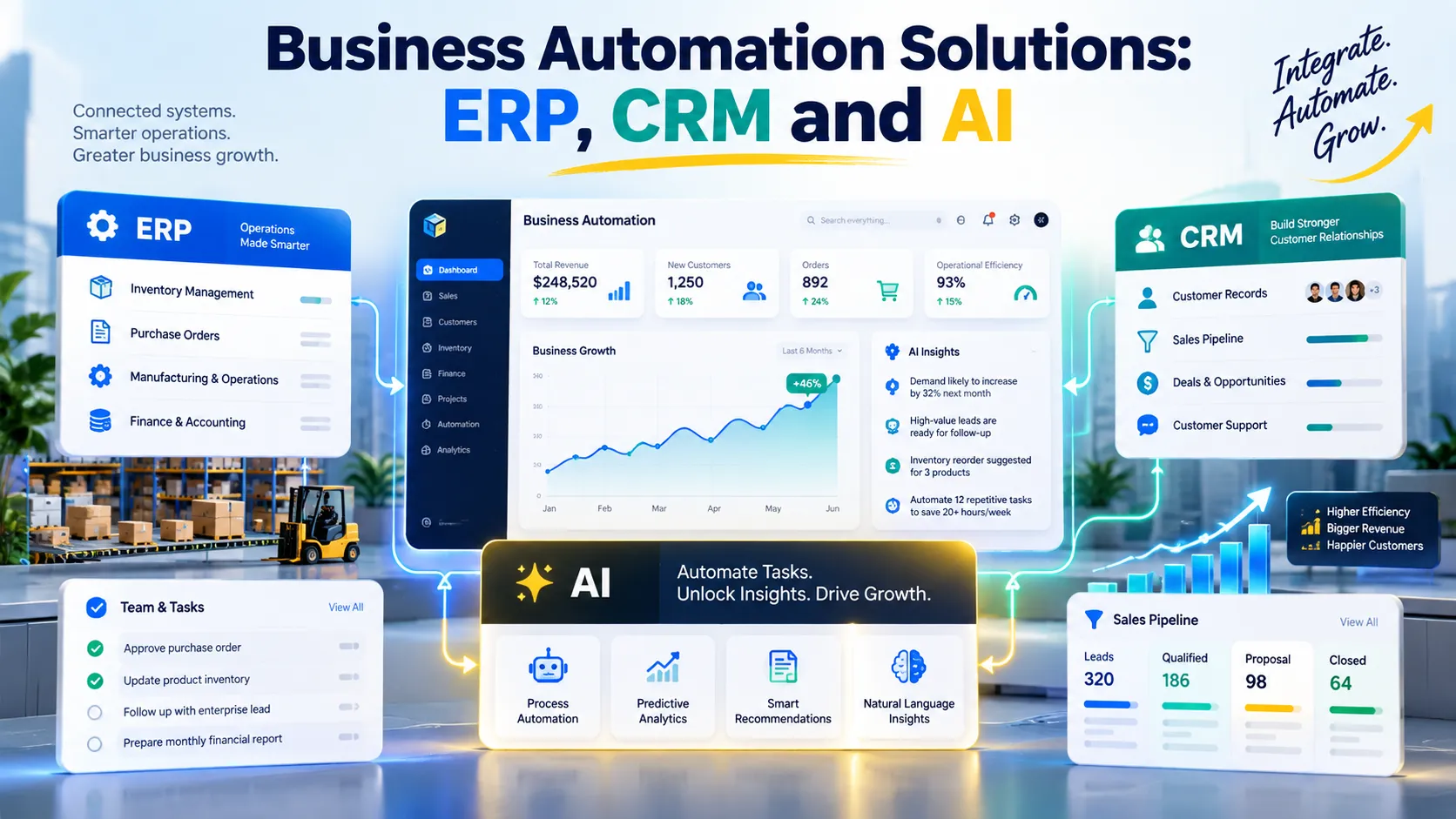
Reduce repetitive work and improve visibility with business automation solutions that connect workflows, ERP, CRM, and AI to help teams make faster, better-informed decisions.
Business automation solutions help organizations connect systems, streamline repetitive work, and improve customer and operational management. This guide explains business process automation, ERP, CRM, and AI, including their differences, practical applications, implementation steps, costs, security considerations, and methods for measuring business value before investing in new technology.
What Are Business Automation Solutions?
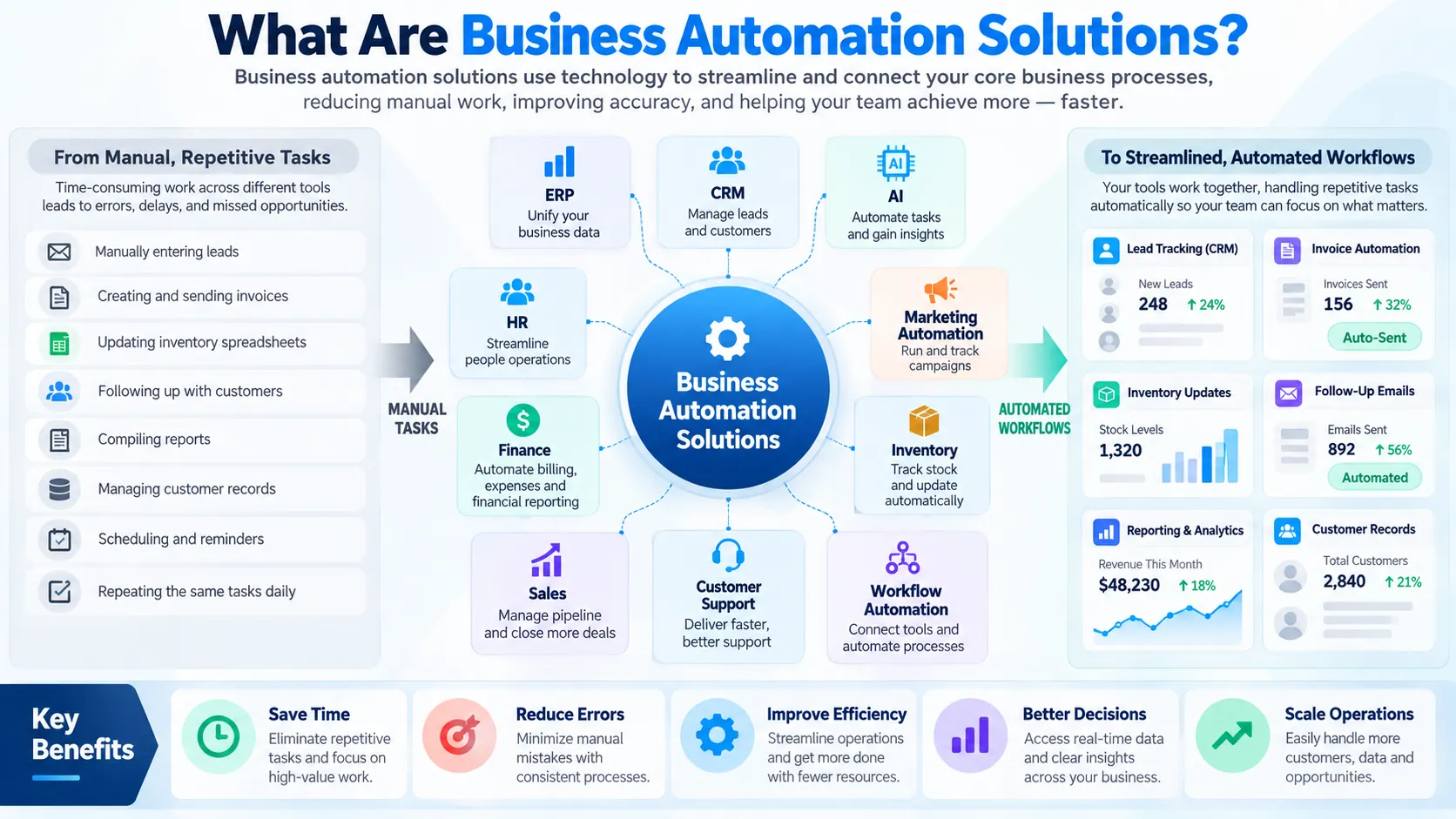
Business automation solutions are technologies and structured workflows that help organizations complete routine activities more efficiently, coordinate information across departments, and reduce unnecessary manual work.
These solutions can include workflow automation platforms, enterprise resource planning (ERP) systems, customer relationship management (CRM) software, robotic process automation (RPA), and artificial intelligence (AI). Some address a single repetitive task, while others coordinate complex processes across an entire organization.
For example, a growing business might receive customer enquiries through its website, record them in a spreadsheet, follow up through email, prepare quotations manually, and update its accounting records separately. This approach can create duplicated work, delayed responses, and inconsistent information.
An integrated workflow could capture each enquiry, create a CRM record, assign a follow-up task, and notify the relevant employee. Once a customer approves a quotation, the system could transfer the appropriate information to an order-management or accounting platform.
The objective is not to automate every activity. It is to identify where technology can improve accuracy, speed, consistency, visibility, or customer experience without introducing unnecessary complexity.
IBM’s guide to business process automation explains how automation connects tasks and systems to streamline operational processes. Microsoft also provides automation guidance covering security, monitoring, governance, and maintainability.
For a business evaluating business automation solutions, these principles offer a practical starting point: understand the existing process, identify the problem, select the appropriate technology, and measure the outcome.
Why Business Automation Matters for Growing Companies
Growth often increases operational complexity. More customers create more enquiries, transactions, documents, approvals, and support requests. If the underlying processes remain manual, employees may spend an increasing proportion of their time coordinating work instead of delivering value.
Reduce Repetitive Administrative Work
Employees frequently copy information between applications, prepare recurring reports, send routine notifications, and check whether tasks have been completed. These activities may appear small individually, but their cumulative cost can become substantial.
Well-designed automation can automate processes such as invoice routing, appointment reminders, lead assignment, document classification, and inventory notifications.
The strongest candidates involve repeatable steps, predictable rules, reliable input data, and measurable outcomes.
Improve Accuracy and Data Consistency
Manual data entry can introduce spelling differences, duplicate records, missing fields, and incorrect values. When separate departments maintain their own records, the organization may struggle to identify which information is current.
Automation can transfer information between connected systems and apply validation rules before accepting a transaction.
However, automation does not guarantee accuracy. If a source system contains incorrect information, an automated workflow may spread that error more quickly. Data validation, exception handling, and reconciliation remain essential.
Improve Customer Experience
Customers expect timely responses, accurate information, and consistent service. A business that manually handles every enquiry may struggle to maintain these standards as demand grows.
CRM workflows can notify employees about new leads, remind sales representatives to follow up, and organize customer interactions. Support automation can route enquiries to the right team and provide immediate answers to routine questions.
Human employees should remain available when a customer needs judgment, reassurance, negotiation, or a personalized response.
Support Better Business Decisions
Disconnected spreadsheets and applications make reporting slower and less reliable. Integrated systems can provide a more consistent view of sales, finance, inventory, service delivery, and other business activities.
Managers can then evaluate performance using shared definitions and more timely information.
For business automation solutions to deliver this benefit, leaders must establish data ownership, reporting rules, and responsibilities for correcting inaccurate records.
Business Process Automation, ERP, CRM and AI: What Is the Difference?
These technologies solve related but distinct problems. Understanding their roles helps businesses avoid buying overlapping tools or expecting one application to solve every operational challenge.
| Technology or approach | Main purpose and suitable use |
|---|---|
| Business process automation (BPA) | Coordinates multi-step workflows, approvals, notifications, and information transfers across people and systems |
| Enterprise resource planning (ERP) | Connects core operations such as finance, purchasing, inventory, production, and supply chain management |
| Customer relationship management (CRM) | Organizes leads, customer records, sales opportunities, communications, and customer service |
| Robotic process automation (RPA) | Performs repetitive, rule-based actions through software interfaces, especially when direct integrations are unavailable |
| Artificial intelligence (AI) | Supports tasks such as classification, summarization, prediction, document extraction, and conversational assistance |
| Integration platforms and APIs | Allow applications to exchange data and coordinate actions through defined interfaces |
Business Process Automation
business process automation uses software to coordinate a sequence of activities toward a defined business outcome.
A workflow might start when a customer submits a form, continue when the system validates the information, and finish when an employee approves a request and the system records the result.
BPA can combine APIs, workflow engines, RPA, and AI. The important distinction is that it addresses the process rather than simply automating an isolated click or data entry task.
Enterprise Resource Planning
An ERP system connects core business functions through shared processes and data. Finance, purchasing, inventory, human resources, and operations may use different modules within the same platform.
ERP is particularly useful when an organization needs consistent records across departments and stronger control over transactions.
SAP’s ERP implementation guidance, updated in January 2026, discusses preparation, implementation risks, and the importance of integrated business information.
Customer Relationship Management
CRM software focuses on relationships with prospective and existing customers. It helps teams organize contact information, track sales opportunities, record communications, and coordinate follow-up activities.
Salesforce’s CRM guide explains how CRM systems support sales, marketing, ecommerce, and customer service.
Artificial Intelligence
AI can support tasks that involve interpreting text, recognizing patterns, summarizing information, or generating recommendations.
For example, AI may categorize incoming customer enquiries, extract information from invoices, summarize support conversations, or help forecast demand.
Unlike a simple rule-based workflow, an AI system may produce uncertain or incorrect results. Important decisions therefore need appropriate validation, access controls, and human oversight.
Which Processes Should You Automate First?
The best starting point is usually a clearly defined process that consumes meaningful time, follows predictable rules, and has a measurable business outcome.
Use these criteria to evaluate possible automation opportunities:
- High frequency: The task happens often enough that small time savings accumulate.
- Repetitive work: Employees follow similar steps each time rather than making highly individualized decisions.
- Clear rules: The organization can define valid inputs, expected outputs, and exception conditions.
- Reliable information: The necessary data is available, reasonably accurate, and accessible to the relevant systems.
- Measurable impact: The business can track time, errors, processing delays, service quality, or another meaningful outcome.
- Manageable risk: Errors can be detected and corrected before they cause significant financial, legal, or customer harm.
A useful example is invoice routing. If employees repeatedly receive invoices, check basic fields, send them to the appropriate approver, and track their status, automation may reduce administrative work.
By contrast, a sensitive employee dispute or a complex negotiation may require human judgment. Automating routine administration around such activities may help, but replacing the judgment itself may be inappropriate.
The goal is to automate the process where technology can improve execution while keeping people responsible for decisions that require expertise or accountability.
Practical Business Automation Examples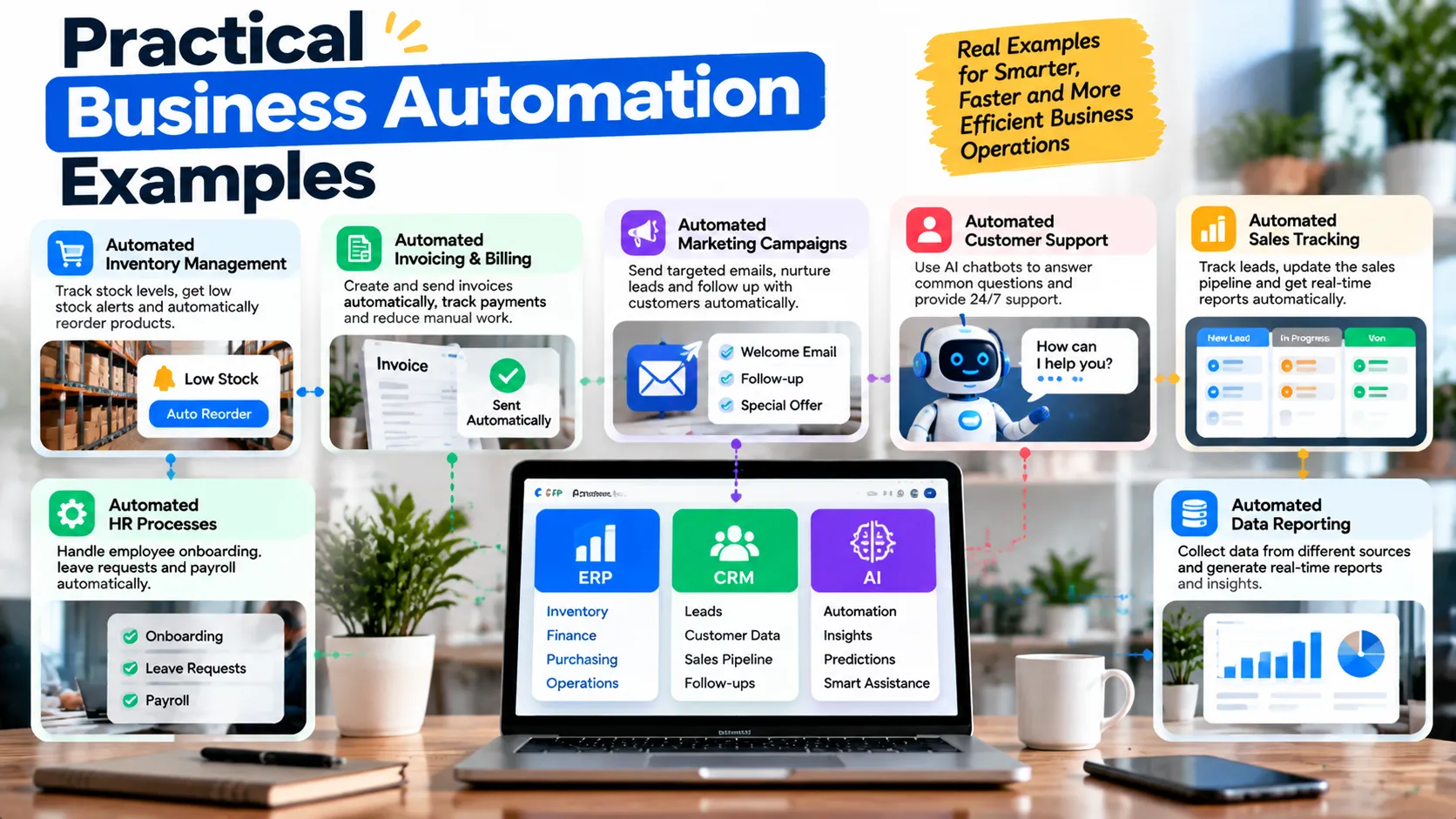
Sales and Lead Management
A service company may receive enquiries through website forms, email, social media, and advertising campaigns. If employees record these enquiries separately, some leads may be missed or receive delayed responses.
A connected workflow can capture approved data, identify potential duplicates, create CRM records, assign ownership, and schedule follow-up tasks.
The team can also record the source of each lead, allowing managers to compare enquiry quality across marketing channels.
For businesses improving the website side of this journey, GrowthAxis Solutions offers Business Website Design, which includes planning page structure, contact pathways, and calls to action. Website improvements can complement automation, although they do not replace a dedicated CRM or ERP implementation.
Finance and Invoice Processing
Accounts payable teams often receive invoices from several suppliers in different formats. Employees may need to extract information, check purchase orders, confirm approvals, and enter payment details.
An automated workflow can extract selected fields, validate them against existing records, flag mismatches, and route the invoice to the appropriate reviewer.
Payments should not proceed solely because a document has been processed automatically. Businesses should retain approval controls, fraud checks, and clear responsibility for financial authorization.
Inventory and Purchasing
A retailer or distributor may use automation to monitor stock levels and notify purchasing staff when inventory falls below a defined threshold.
A more integrated system can combine stock records, open orders, supplier lead times, and demand forecasts. It can then recommend replenishment quantities or prepare a purchase request for review.
These functions become more useful when the underlying inventory records remain accurate and the business has clear rules for handling unusual demand.
Customer Support
Support teams can automate ticket categorization, assignment, priority notifications, and routine status updates.
AI may help summarize a long conversation or suggest a response based on approved documentation. A human agent should review sensitive or uncertain cases and handle requests that require empathy or specialized judgment.
The business should measure resolution quality, response times, escalation rates, and customer satisfaction rather than simply counting how many interactions the system handles without human intervention.
Human Resources and Employee Onboarding
A structured onboarding workflow can coordinate document collection, account requests, training assignments, and manager notifications.
Automation can improve consistency, but employee data requires careful handling. Access should follow role-based permissions, and sensitive decisions should remain subject to appropriate human review.
How ERP and CRM Work Together
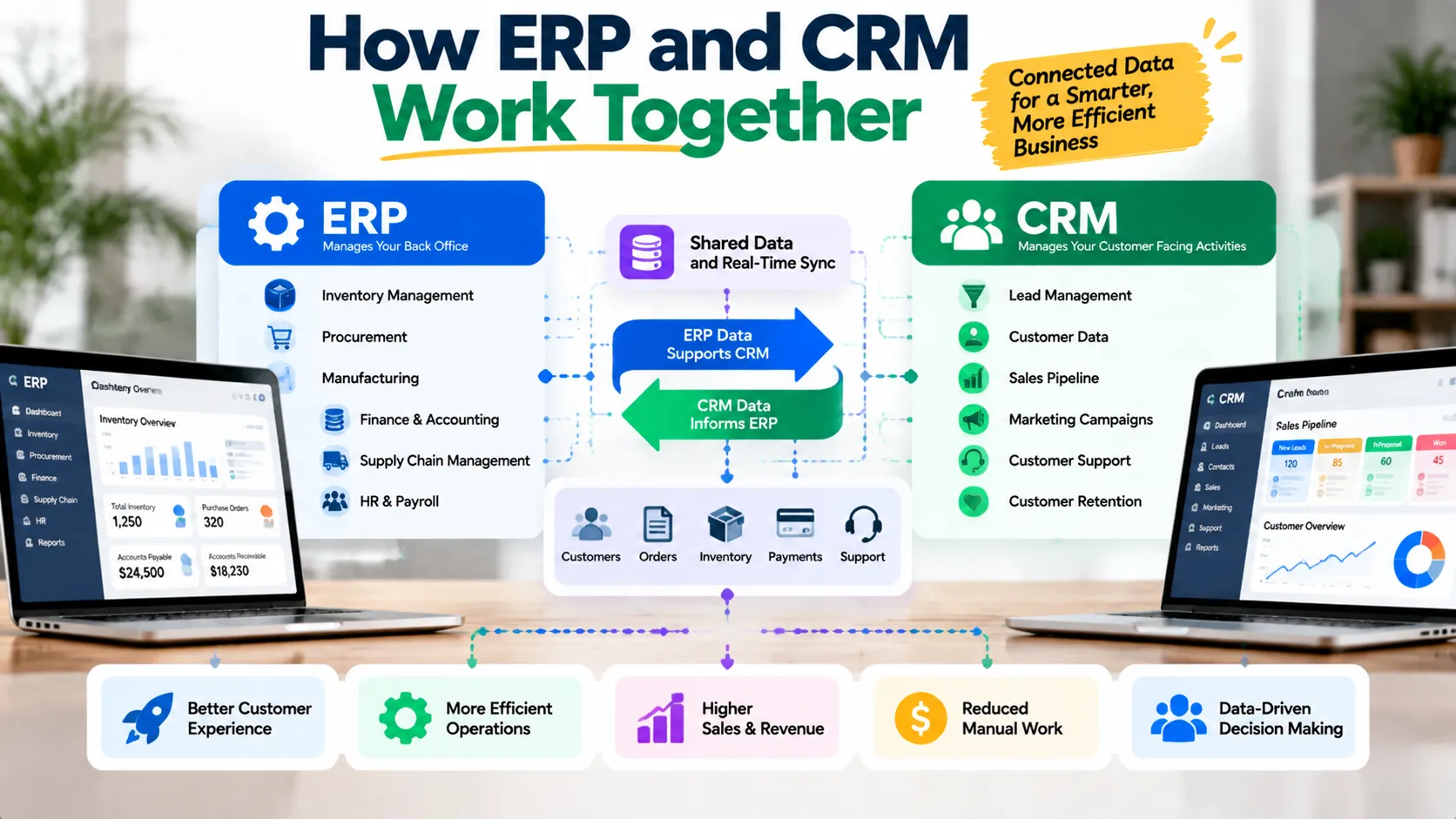
ERP and CRM systems are often more valuable when they share appropriate information.
CRM can help a sales team manage a prospective customer’s journey, from initial enquiry through qualification, quotation, and account management. ERP can handle the operational and financial transactions that follow, such as inventory allocation, order fulfillment, invoicing, and accounting.
Consider a distributor receiving a large order from an existing customer.
First, the CRM provides the sales representative with the customer’s contact details, communication history, and opportunity status. Once the order receives the required approval, an integration transfers the relevant order information to the ERP. The ERP checks stock availability, records the transaction, and supports fulfillment and invoicing. The CRM can then receive status updates so the sales team can answer customer questions.
This workflow depends on well-defined data ownership. The CRM might own sales activities and relationship history, while the ERP owns the official order and financial records.
The integration must also handle duplicate requests, failed transfers, conflicting updates, and permission errors. A system that transfers data successfully only under ideal conditions is not ready for reliable business operations.
Before combining platforms, document which system owns each critical record, which fields may change, and what should happen when synchronization fails.
Enterprise Resource Planning Implementation: A Practical Roadmap
An ERP project changes business processes, data, responsibilities, and often employee working habits. Successful enterprise resource planning implementation therefore requires business leadership and operational preparation, not only technical configuration.
Oracle’s ERP implementation guide emphasizes planning, configuration, verification, and deployment preparation. SAP similarly highlights process alignment, data quality, and user adoption as important implementation considerations.
Step 1: Define Business Objectives
Start by identifying the problems the ERP should solve. These might include inconsistent financial reporting, inaccurate inventory, slow purchasing approvals, or duplicated records across departments.
Define a baseline for each priority problem. For example, measure the current time required to close monthly accounts or reconcile inventory records.
These measurements help the business evaluate whether the implementation delivers meaningful improvements.
Step 2: Map Existing Processes
Document how work currently moves between departments, employees, and systems.
Identify duplicated approvals, unnecessary data entry, inconsistent definitions, and steps that no longer serve a useful purpose.
Do not reproduce every existing workflow automatically. ERP projects offer an opportunity to simplify processes before configuring the new system.
Step 3: Select the Right Platform and Scope
Compare ERP platforms against the organization’s actual requirements, integration needs, reporting expectations, and operational constraints.
Determine which capabilities must exist at launch and which can wait for later phases. A staged rollout may reduce risk when the business has several departments or complex operational dependencies.
Step 4: Clean and Prepare Data
Data migration can become one of the most difficult parts of an ERP project.
Review customer records, supplier information, product codes, inventory quantities, financial balances, and duplicate entries before transferring them. Establish rules for data ownership and reconciliation.
The team should test migration with representative data and confirm that critical balances and relationships remain correct.
Step 5: Configure Before Customizing
Where practical, begin with the platform’s standard capabilities and configuration options. Custom code can solve legitimate requirements, but it also adds testing and maintenance responsibilities.
Every customization should have a clear business justification. The organization should understand the ongoing cost of supporting it through upgrades and future changes.
A well-planned enterprise resource planning system implementation aligns the system with the organization’s needs without introducing avoidable complexity.
Step 6: Test, Train, and Deploy
Test end-to-end processes, permissions, reporting, integrations, and failure scenarios before production deployment.
Train users on the workflows they will actually perform. Communicate process changes early and provide a route for reporting problems.
A controlled rollout should include contingency plans, monitoring, support ownership, and a way to correct or reverse a problematic release where feasible.
Step 7: Review Post-Launch Performance
After launch, monitor system reliability, data quality, user adoption, processing times, and the business metrics established at the beginning.
Successful ERP implementations continue beyond the initial go-live date. Teams may need to resolve process gaps, improve reports, refine configuration, and provide additional training as real usage reveals new requirements.
CRM Implementation: Turning Customer Data into Action
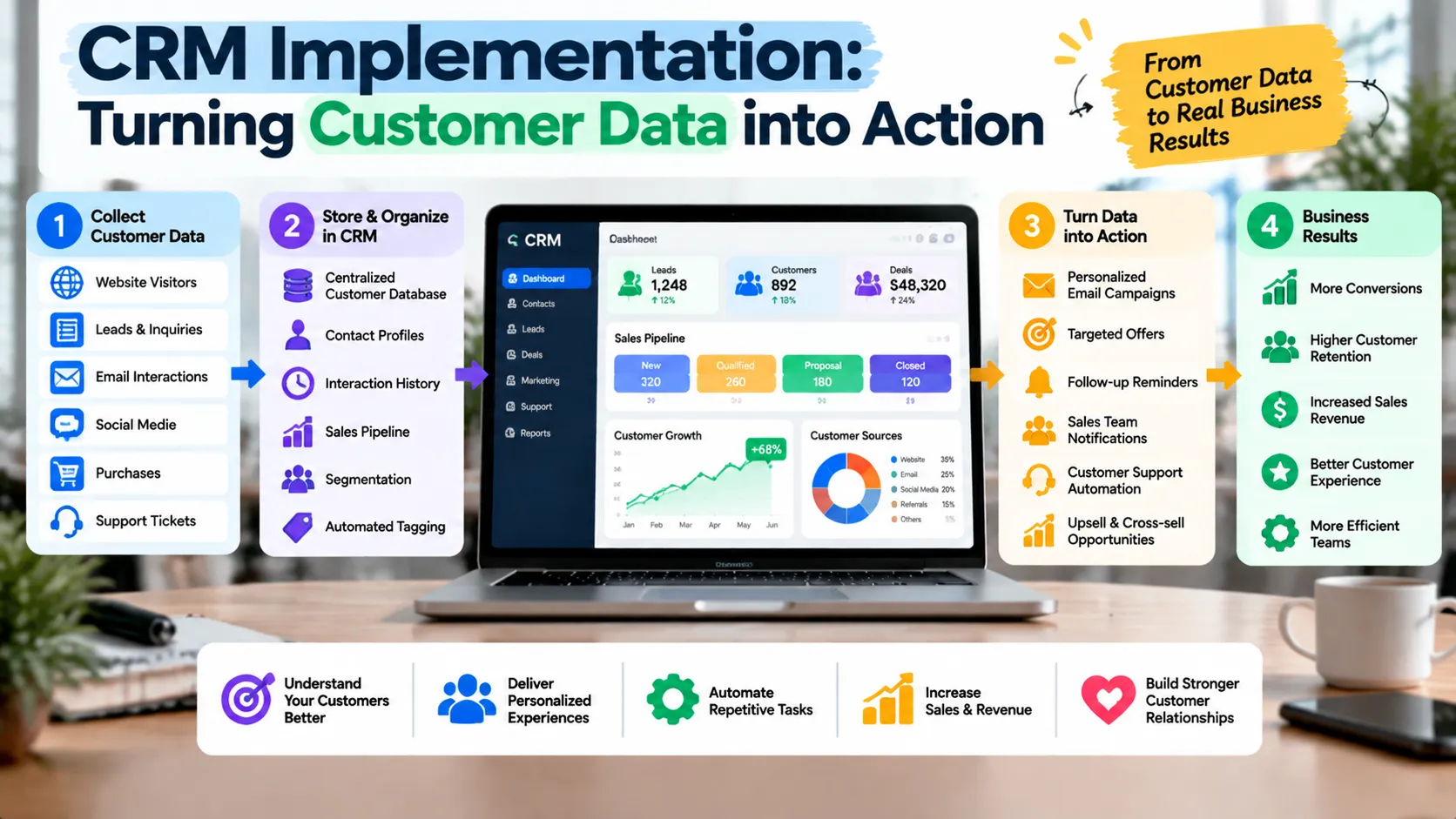
CRM software provides limited value when employees do not maintain reliable records or when the system does not fit their sales process.
Define the Customer Journey
Identify the stages a prospect moves through, from initial enquiry to qualification, proposal, negotiation, and a final outcome.
Each stage should have a clear definition. If one employee labels an opportunity as qualified because the prospect responded to an email while another requires confirmed budget and project timing, reporting will become inconsistent.
Standardize Data and Ownership
Define required fields, duplicate handling, record ownership, and rules for updating contact information.
The business should decide which fields are essential for sales follow-up and which can be collected later. Excessive mandatory fields can discourage employees from maintaining records.
Automate Follow-Up Carefully
CRM workflows can create reminders, assign leads, notify sales representatives, and schedule routine communications.
However, follow-up rules should account for customer consent, communication preferences, regional requirements, and the risk of sending irrelevant messages.
A useful CRM automation supports meaningful interactions rather than overwhelming customers with generic messages.
Measure Adoption and Results
Track whether employees use the system consistently and whether it improves the sales process.
Relevant measures include lead response time, opportunity progression, data completeness, forecast accuracy, and qualified conversion rates. Interpret these metrics alongside lead quality and the length of the sales cycle.
AI Solutions for Business Automation
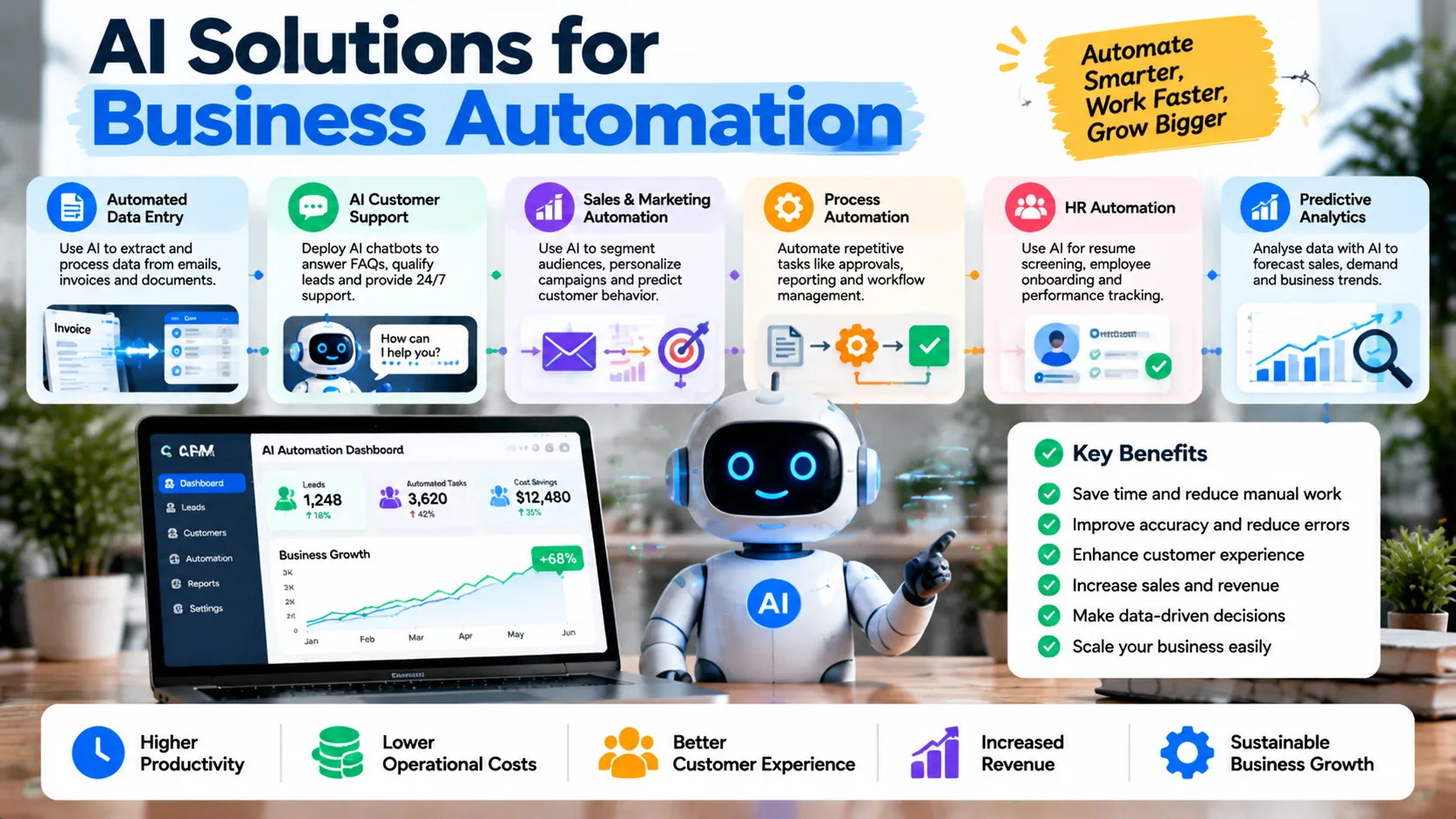
AI can extend traditional automation by helping systems interpret less-structured information and generate recommendations. It can be valuable when applied to a defined task with appropriate controls.
AI for Document Processing
AI can extract information from invoices, contracts, applications, or other documents and present it for validation.
For example, a system may identify an invoice number, supplier name, date, and total amount. A validation workflow can compare those fields with purchase records before sending the document for approval.
The organization should test extraction accuracy across different document formats and define when employees must review uncertain results.
AI Chatbots and Customer Service
A chatbot can answer common questions, guide users toward relevant information, and collect details before routing an enquiry to an employee.
For reliable results, the system needs an approved knowledge source, clear limits, and a path to human assistance. It should not invent policy details or claim that an action succeeded when the underlying system has not confirmed it.
AI for Forecasting and Decision Support
AI models can help analyze historical demand, identify patterns, or generate forecasts. These outputs can support planning but should not be treated as guaranteed predictions.
The business needs to monitor data quality, changes in operating conditions, model performance, and the consequences of incorrect recommendations.
AI Governance and Risk Management
AI systems can introduce risks involving privacy, security, bias, unreliable outputs, and excessive reliance on automated decisions.
NIST’s AI Risk Management Framework and its Generative AI Profile provide structured guidance for identifying and managing these risks.
Businesses should establish acceptable-use policies, limit access to sensitive information, document important decisions, and assign responsibility for monitoring AI-enabled workflows.
The appropriate degree of human review depends on the consequences of an error. A draft internal summary may require limited checking, while a financial approval or consequential customer decision may need stronger controls.
How to Choose the Right Business Automation Software
The best platform depends on the process, existing systems, budget, technical resources, and level of operational risk.
Before comparing vendors, document the workflow and decide whether the problem requires a rule-based automation, an ERP module, a CRM feature, an integration, AI assistance, or a combination.
The following decision framework can help narrow the options.
| Decision question | What it helps determine |
|---|---|
| Is the task repetitive and rule-based? | A workflow tool or RPA may be sufficient |
| Does the problem span finance, inventory, procurement, or operations? | An ERP platform may provide the required shared records and controls |
| Does the team struggle to manage leads and customer interactions? | CRM configuration or implementation may be the priority |
| Does the workflow require interpreting text or unstructured documents? | AI may help, subject to accuracy testing and human review |
| Do existing applications already support the process? | Configuration or integration may cost less than replacing them |
| Does the workflow involve sensitive data or consequential decisions? | Stronger security, approval, audit, and governance controls may be necessary |
Evaluate Integration and Ownership
Check whether the software supports the required APIs, connectors, data formats, and authentication methods.
Confirm how the business can export its records, recover from failures, manage access, and continue operating if a vendor changes its product or pricing.
Consider implementation partners and internal skills as well as licensing. A platform that looks inexpensive may require significant integration work, while a more comprehensive system may reduce the number of separate tools the organization must maintain.
Consider Total Cost of Ownership
Compare more than the initial subscription or development price. Include implementation, migration, configuration, integration, training, support, infrastructure, security, and future upgrades.
The business should also estimate the cost of disruption during deployment and the effort required to change existing processes.
A practical evaluation may favor a small workflow improvement over a major platform replacement. The right decision is the one that addresses the highest-priority problem at an acceptable level of risk and cost.
How to Measure ROI from Business Automation Solutions
A business case should explain what will improve, how the organization will measure it, and whether the benefit justifies the investment.
Start with a baseline. Measure the current processing time, error rate, number of manual handoffs, response time, and other indicators relevant to the process.
For example, imagine a company processes 300 invoices per month and spends an average of eight minutes on manual handling per invoice. That represents 40 hours of handling time each month.
If a redesigned workflow reduces routine handling to three minutes per invoice, the theoretical handling time falls to 15 hours, saving 25 hours monthly before exception handling, system maintenance, and other costs. This is an illustrative calculation, not a guaranteed result.
The business should validate actual results after deployment and account for any new review tasks introduced by the automation.
A useful ROI formula is:
ROI = (Net financial benefit ÷ Total investment) × 100
For a consistent evaluation period, calculate net financial benefit by subtracting the relevant costs from the measurable benefits. Avoid counting the same saving twice or treating every hour saved as a direct cash saving.
Some benefits may be non-financial, such as better auditability, more reliable reporting, or improved customer experience. Record those separately rather than assigning them unsupported monetary values.
A Practical 90-Day Automation Roadmap
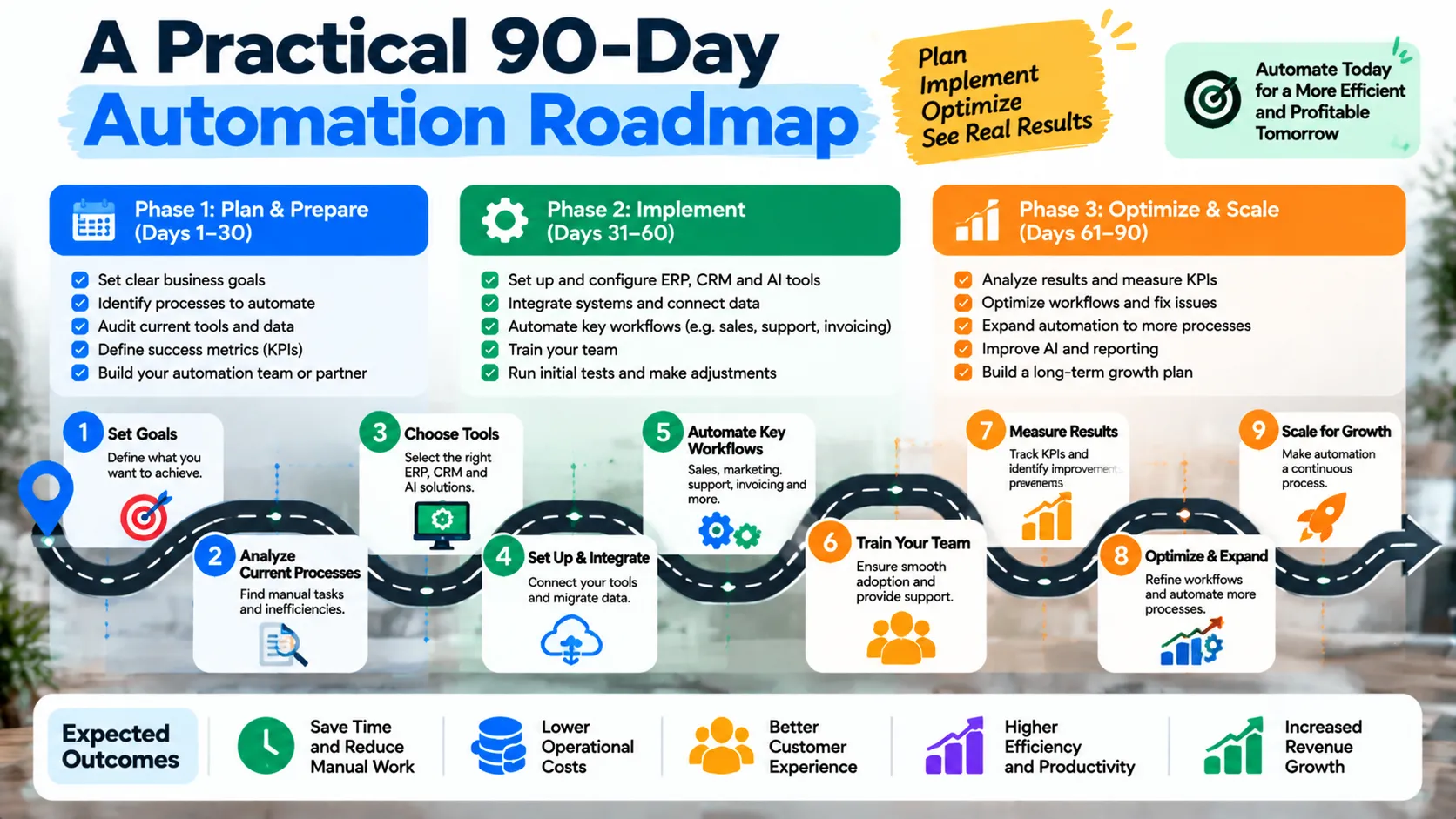
A staged roadmap helps a business test its assumptions before committing to a large implementation. The timing below is a planning framework, not a promise that every project can launch within 90 days.
Days 1–30: Discover and Prioritize
Map important workflows, interview the employees who perform them, identify data dependencies, and establish baseline metrics.
Select one manageable pilot with a clear business owner. Define the expected outcome, acceptable error rate, approval requirements, and escalation process.
Also determine whether existing software can solve the problem through configuration or integration before purchasing a new platform.
Days 31–60: Build and Validate a Pilot
Configure or develop the selected workflow in a controlled environment. Test normal scenarios, exceptions, access permissions, data accuracy, and recovery behavior.
Ask representative employees to evaluate the process. Document their feedback and revise the workflow before production use.
Keep the pilot narrow enough that problems can be identified and corrected without disrupting critical operations.
Days 61–90: Deploy and Measure
Deploy the validated workflow with appropriate training, monitoring, and support ownership.
Compare results with the original baseline. Review time savings, error rates, user adoption, customer impact, and total operating cost.
If the results justify further investment, identify the next process that would benefit from the same approach. If the pilot does not meet expectations, investigate why before expanding it.
Common Mistakes to Avoid
Even well-funded automation projects can fail when organizations focus on technology before understanding their processes. Avoid these common mistakes:
- Automating a broken workflow: Remove unnecessary steps and clarify responsibilities before translating the process into software.
- Buying overlapping tools: Compare current capabilities and integration options before introducing another platform.
- Ignoring data quality: Clean important records and define ownership before migrating or synchronizing information.
- Over-customizing ERP: Use standard configuration where practical and justify custom development through clear business requirements.
- Treating AI output as fact: Validate uncertain results and require human approval for consequential decisions.
- Removing essential human oversight: Keep appropriate review and escalation paths for financial, legal, sensitive, or customer-impacting decisions.
- Underestimating change management: Train employees, communicate the reasons for the change, and provide support after launch.
- Measuring activity instead of value: Track meaningful outcomes such as cycle time, error rates, service quality, and validated cost savings.
Expert Recommendations for Sustainable Automation
The strongest business automation solutions evolve with the organization rather than becoming isolated technology projects.
First, appoint a process owner who understands the business outcome and can make decisions when requirements change. Technical teams can implement workflows, but business stakeholders must define what success means.
Second, document system responsibilities and data flows. Teams should know where authoritative records live, which applications may update them, and what happens when an integration fails.
Third, establish monitoring and exception handling before the system becomes business-critical. Every automated process should have an owner, a way to detect failures, and a defined response when something goes wrong.
Fourth, treat security and maintenance as recurring responsibilities. Review permissions, update dependencies, verify backups, and assess whether changing business requirements affect the original design.
Finally, scale based on evidence. A successful pilot can justify a broader rollout, but a workflow that performs well in one department may need different controls or integrations elsewhere.
For projects involving customer-facing websites, online lead capture, and digital customer journeys, GrowthAxis Solutions provides Web Development services and Website Maintenance. These services can support the website side of a connected digital workflow; ERP or CRM implementation requirements should be discussed separately to establish project fit.
Businesses can also explore the wider GrowthAxis Solutions service portfolio or contact the team to discuss their current digital challenges and determine a practical next step.
Conclusion
Business automation solutions can help organizations reduce repetitive work, connect ERP and CRM systems, improve reporting, and use AI more effectively. Start with a measurable business problem, evaluate existing tools, and implement changes in controlled stages. Clear ownership, reliable data, security, and ongoing measurement matter as much as the technology itself. Contact GrowthAxis Solutions to discuss your digital requirements and identify a practical next step.
Frequently Asked Questions
1. What are business automation solutions?
Business automation solutions are software, integrations, and workflows that help organizations perform repetitive tasks, coordinate information, and manage business processes more efficiently. Examples include invoice routing, CRM follow-up, inventory alerts, reporting workflows, and AI-assisted document processing. The right solution depends on the process, available systems, and the risks involved.
2. What is the difference between business automation and business process automation?
Business automation is a broad term covering technologies that automate business activities. Business process automation focuses on coordinating complete workflows that may involve multiple tasks, employees, and applications. A simple scheduled notification is task automation, while coordinating approvals, records, and notifications across departments is a broader process automation use case.
3. What is the difference between ERP and CRM?
ERP systems coordinate core operational functions such as finance, inventory, purchasing, and supply chain management. CRM systems organize customer relationships, sales opportunities, interactions, and follow-up activities. Businesses may use both systems together, with integrations transferring relevant information while each system maintains responsibility for its designated records.
4. Which business processes should a company automate first?
Start with processes that occur frequently, follow clear rules, involve repeated data entry or handoffs, and have measurable costs or delays. Invoice routing, lead assignment, appointment reminders, and routine reporting are common candidates. Avoid automating a process before understanding its exceptions, data quality, security requirements, and need for human judgment.
5. Does a small business need an ERP system?
A small business may benefit from ERP when disconnected systems create significant reporting, inventory, finance, or operational problems. However, a company with straightforward needs may be better served by established accounting, inventory, and CRM applications. Evaluate business complexity, integration needs, implementation effort, and total ownership cost before choosing an ERP.
6. How does AI improve business automation?
AI can help automate tasks involving unstructured information, such as classifying enquiries, summarizing support conversations, extracting document fields, or forecasting demand. It can complement rule-based workflows but may produce inaccurate or uncertain results. Businesses should test performance, restrict access to sensitive data, monitor outcomes, and maintain human review for important decisions.
7. What is involved in ERP system implementation?
ERP system implementation typically involves defining business objectives, mapping processes, selecting and configuring the platform, preparing data, building integrations, testing workflows, training employees, and deploying the system. Post-launch monitoring and continuous improvement are also important. Success depends on business readiness, data quality, user adoption, and realistic project scope.
8. How much do business automation solutions cost?
Costs depend on workflow complexity, software licences, integrations, development, migration, training, infrastructure, support, and security requirements. A simple automation may require relatively little implementation work, while an ERP rollout can involve substantial organizational change. Compare the full cost over a consistent period and evaluate it against measured business benefits.
9. How can a business measure automation ROI?
Establish a baseline for processing time, manual effort, error rates, and other relevant measures before implementation. After deployment, compare actual performance and account for ongoing costs, exception handling, and maintenance. Calculate ROI using validated net financial benefit and total investment, while reporting non-financial improvements separately.
10. Is business process automation software secure?
Security depends on the software, configuration, access controls, integrations, data handling, monitoring, and maintenance. Businesses should use least-privilege permissions, secure credentials, appropriate logging, tested recovery procedures, and documented incident response. AI-enabled workflows may need additional safeguards for privacy, unreliable outputs, and consequential decisions. Regular reviews help maintain appropriate protection as the system evolves.