
Business Website Design and Development: A Complete Guide
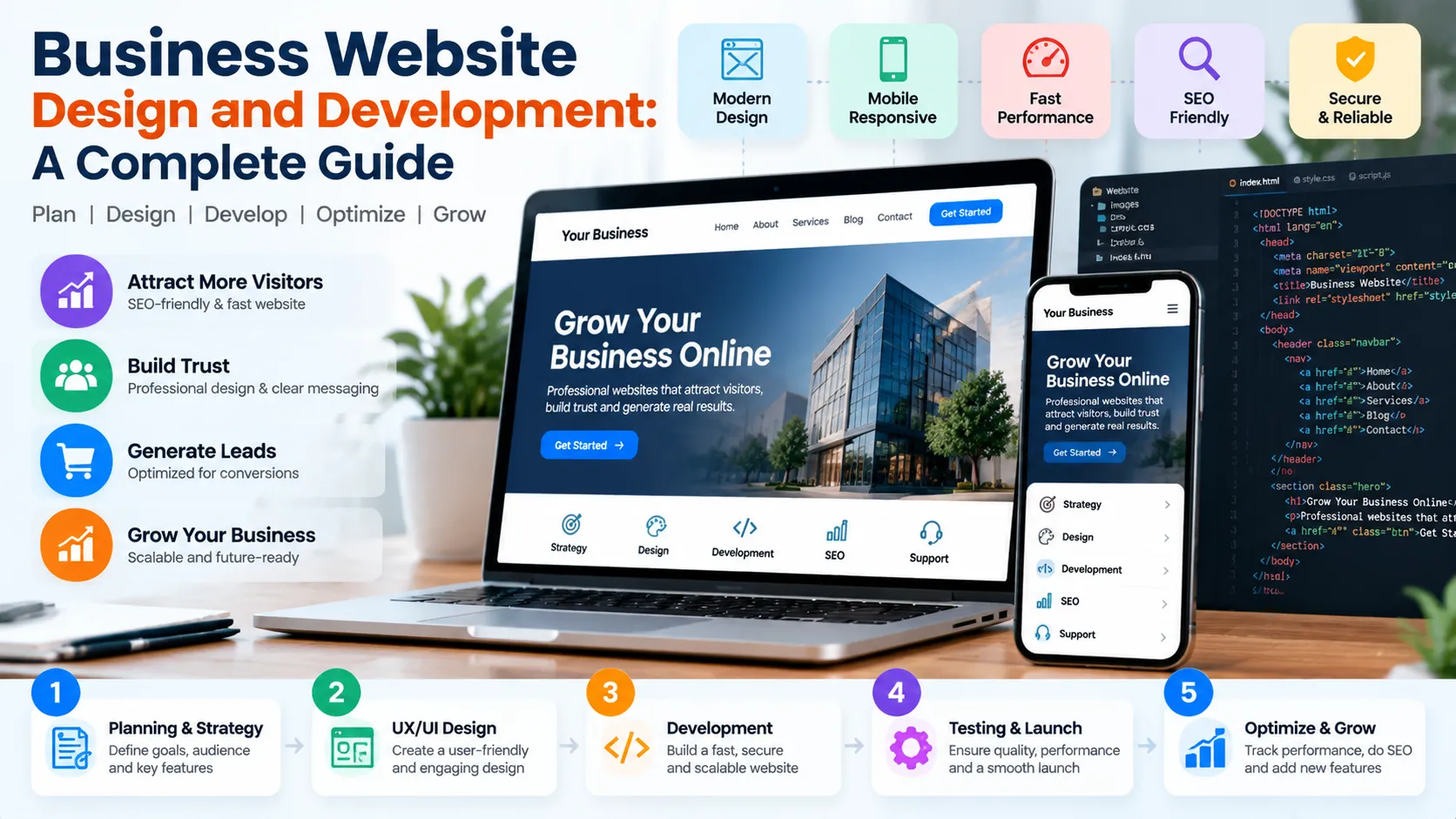
A strategic business website design and development plan turns your online presence into a clear, trustworthy experience that helps visitors understand, choose, and contact your business.
Business website design and development combine strategy, visual design, user experience, technical implementation, SEO, security, and conversion optimization. This guide explains how to plan a website, choose the right platform, create essential pages, improve performance, prepare for launch, and measure results so your website supports sustainable business growth.
What Is Business Website Design and Development?
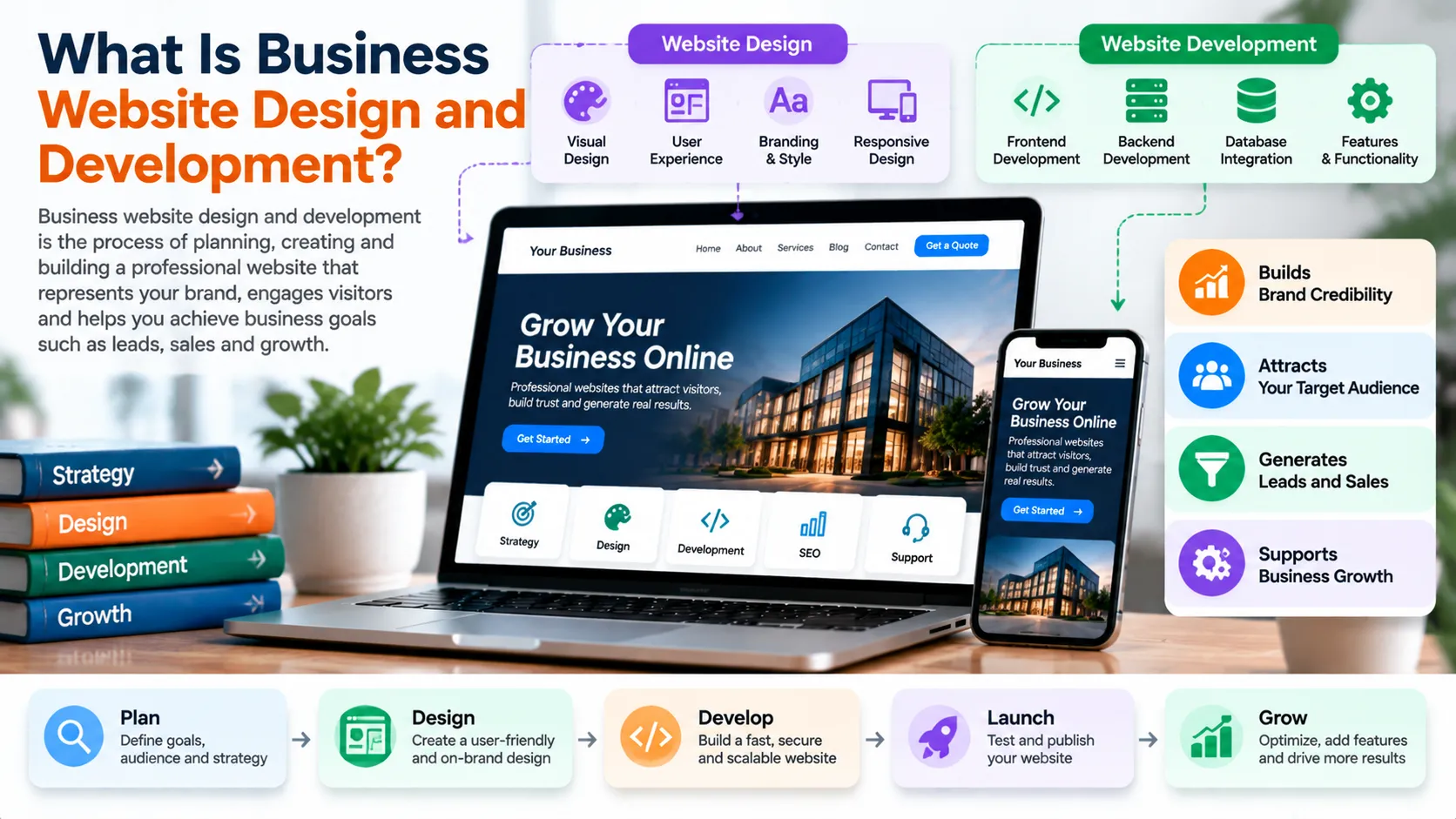
Business website design and development is about planning, creating, building, testing, launching and keeping a website running. It helps a company reach its business goals.
Website design is, about how the site looks and feels. It’s about making sure visitors can easily move from one page to another understand what’s on the site recognize the brand and take the actions the business wants. That could mean filling out a form or buying something.
Website development is the side. It turns the design into a working website using code, content management systems, databases, online tools and other technical parts.
A good business website brings design and development together. It doesn’t treat them as jobs. A pretty design won’t help if the site is hard to use. Even the best code won’t help if the message is confusing. It’s too hard to contact the company.
Think of a consulting company that wants to attract clients from over the world. The consulting company’s website must show what the consulting company knows prove that the consulting company is trustworthy list the consulting company’s services answer questions and make it simple, to book a consultation. Every design choice and every line of code should support those goals.
This same idea works for stores, service providers, tech companies, local shops and big brands too.
The best way to start is to focus on the business problem not on a theme, a programming language or the newest design trend. The team should first decide what the consulting company’s website must do. Then choose the tools and approach to make it happen.
Google’s SEO Starter Guide reinforces the importance of creating useful content and making websites understandable to both visitors and search engines.
For businesses planning a new website or improving an existing one, GrowthAxis Solutions offers a dedicated Business Website Design service focused on website structure, responsive design, contact functionality, and a practical SEO foundation.
Why Your Business Needs a Strategic Website
A business website serves as a central destination for information about your company, products, services, and expertise. Social platforms and advertising channels can introduce people to your brand, but your website gives visitors a place to evaluate your offering and take the next step.
Build Credibility and Trust
I see that visitors often go to a company’s website to decide whether the company seems real, professional and fits what visitors need.
A clear explanation of services a look and feel, honest contact details, helpful information and solid proof can help visitors make a judgment about the company. Real customer feedback, examples of work and verified credentials can build trust when they match the company’s actual experience.
It is important to avoid testimonials, over-the-top claims, about results or projects in a portfolio that can’t be proven. Trust comes from being accurate just as it comes from how thingsre presented.
Generate Qualified Enquiries
I think a website can help turn people who’re interested into possible customers by using things like asking for help filling out contact forms asking for prices or asking about products. These are all ways to get people to take action.
Just having a lot of visitors does not mean the business will do well. People need to know what the company does why it might be right for them and what they should do next.
So the way a business website is designed and built should follow the path a visitor takes. Connect it to something that makes business sense. A page, about a service might answer worries. Then ask people to ask for a quote. An article that teaches a lot might send readers to a related service when they need help from a professional.
Support Search Visibility
A well-structured website helps search engines discover and understand its pages. Descriptive URLs, useful page content, logical navigation, accessible links, and a clear site hierarchy support this process.
Search visibility still depends on multiple factors, including relevance, competition, content quality, technical accessibility, and the website’s overall authority. A new website cannot guarantee first-page rankings simply by following a checklist.
Google explains these principles in its official Search Essentials documentation.
Create a Foundation for Growth
A business website needs to allow for changes in products, services, markets and marketing priorities.
For example a company might start with five pages and a contact form. After some time it might need a resource library lead generation landing pages, a customer portal, content in languages or online shopping features.
A smart plan, for building a business website takes these needs into account without making the first version too complicated.
How to Plan a Business Website Before Development
The planning stage determines whether the finished website solves the right problems. Starting development before agreeing on goals, audience, content, and functionality often creates avoidable revisions.
Define the Website’s Primary Objective
First I think the first step is to figure out the outcome that the website should help with. If the company offers services it might want to get more qualified enquiries. If the business sells goods online it may want product purchases. If the company creates software it could need product demonstrations, trial registrations or sales consultations.
Next I think the next step is to pick one goal and then list the smaller goals that support that main goal.
For example I think a B2B consulting website might want to get consultation requests. It can use case studies, service pages and educational resources to make visitors feel confident. That gives a direction for the information architecture, the content planning and the calls, to action. It also keeps the website organised. Helps visitors find what they need.
Understand the Target Audience
Identify the people who will use the website and the questions they need answered.
Audience research can draw on customer interviews, support conversations, sales enquiries, competitor reviews, analytics, and keyword research. These sources can reveal the terminology customers use, the objections they raise, and the information they need before making a decision.
An international business should also consider differences in language, currency, time zones, cultural expectations, and purchasing processes where relevant.
Business website design and development becomes more effective when the team uses these insights to prioritize useful content and remove unnecessary friction.
Plan the Site Structure
Create a sitemap before designing individual pages. The sitemap should show the main sections, supporting pages, and relationships between related resources.
A simple service business might organize its website around the homepage, company information, service pages, case studies, resources, and contact details. A more complex organization may need additional categories, industry pages, location pages, or product documentation.
Keep navigation understandable. Visitors should not need to explore multiple unrelated menus to find a key service or contact option.
Prepare Content Before Finalizing the Design
Content influences layout, navigation, and conversion decisions. Writing the main messages early helps the designer create a structure that accommodates the information visitors actually need.
Prepare the primary value proposition, service descriptions, supporting evidence, calls to action, FAQs, and relevant images before finalizing page layouts.
The content should explain what the business does, whom it serves, what problems it solves, and why a visitor should consider its offering.
A website should not force important information into tiny text areas simply because a decorative design came first.
What Pages Should Every Business Website Have?
The right page structure depends on the organization, its audience, and its business model. However, most service-based businesses need a clear homepage, dedicated service pages, company information, a contact page, and suitable privacy information.
The following table explains the purpose of common website pages.
| Website page | Primary purpose |
|---|---|
| Homepage | Explain the business, communicate its value, and guide visitors toward important destinations |
| About page | Introduce the organization, its people, relevant experience, and operating principles |
| Services or products | Explain the offer, deliverables, suitability, benefits, and next steps |
| Case studies or portfolio | Demonstrate genuine work, process, and verifiable outcomes |
| Blog or resource center | Answer audience questions and support organic discovery |
| Contact page | Provide clear ways to request information, book a consultation, or discuss a project |
| Privacy and legal pages | Explain relevant data practices and terms according to applicable requirements |
Design a Homepage That Explains the Business Quickly
The homepage should help visitors understand the business without making them interpret vague slogans.
Start with a clear headline describing the offering and intended audience. Add a short supporting explanation, an appropriate call to action, and relevant evidence that helps visitors assess credibility.
Continue with a concise overview of the principal services, the problems they address, and the reasons a visitor might choose the business. Include links to detailed pages for visitors who want additional information.
A strong homepage does not need to explain every detail. Its job is to orient visitors and guide them toward the next relevant page.
Create Dedicated Service Pages
Businesses often make the mistake of describing every service in one long paragraph. This structure can make it difficult for customers to understand individual offerings and difficult for search engines to interpret each page’s purpose.
Create a dedicated page when a service has a distinct audience, search intent, set of deliverables, or purchasing decision.
Each page should explain the problem the service addresses, the scope of work, the process, relevant limitations, and the appropriate next step. Pricing information may be useful when the business can present it accurately and clearly.
For example, GrowthAxis Solutions provides a dedicated Web Development and Business Website Design offering rather than requiring every prospective client to infer website services from a general agency description.
Build Useful Resource Pages
A resource center or blog can answer customer questions before a sales conversation begins. Topics might include website launch planning, platform comparisons, conversion optimization, technical SEO, accessibility, and website maintenance.
Each article should serve a distinct search intent and link to related resources when those links help readers.
For GrowthAxis Solutions, this guide can act as a central resource that later connects to articles such as website launch checklists, WordPress versus custom development, mobile usability, and website speed optimization.
Choosing the Right Website Platform
The best platform depends on the business’s requirements, internal skills, budget, integrations, and long-term maintenance capacity.
A small business with straightforward content requirements may benefit from a content management system. An organization with unusual workflows or complex application requirements may need a more customized solution.
Do not select a platform solely because it is popular or because a competitor uses it. Select the option that supports the actual project.
| Platform approach | Best fit and key consideration |
|---|---|
| WordPress or another CMS | Suitable for many content-driven business websites; assess plugin quality, updates, security, and editorial requirements |
| Hosted website builder | Useful for businesses that prioritize visual editing and simpler administration; check customization limits and platform dependence |
| Ecommerce platform | Appropriate for online stores that need product catalogs, checkout, order management, and payment integrations |
| Custom development | Suitable for distinctive workflows, advanced integrations, or requirements that standard platforms cannot reasonably meet |
| Headless CMS with a custom frontend | Useful for some organizations that need flexible content delivery across multiple channels; it introduces additional technical complexity |
When WordPress Makes Sense
WordPress can support business websites that need editable pages, blogging, service descriptions, forms, and a broad ecosystem of extensions.
Its suitability depends on the theme, plugins, hosting, implementation quality, and maintenance approach. Too many poorly maintained plugins can introduce security, compatibility, or performance problems.
Before choosing WordPress, confirm that the organization can manage updates, backups, access controls, and ongoing support.
When Custom Development Makes Sense
Custom development may be appropriate when a business requires specialized workflows, advanced user roles, proprietary business logic, complex integrations, or application features that conventional platforms cannot support efficiently.
It can provide greater control over implementation, but it also requires careful specification, testing, documentation, and ongoing technical support.
Do not commission a custom application simply to make a basic brochure website appear more sophisticated. The added complexity should solve a real requirement.
Essential Design Principles for a Professional Business Website
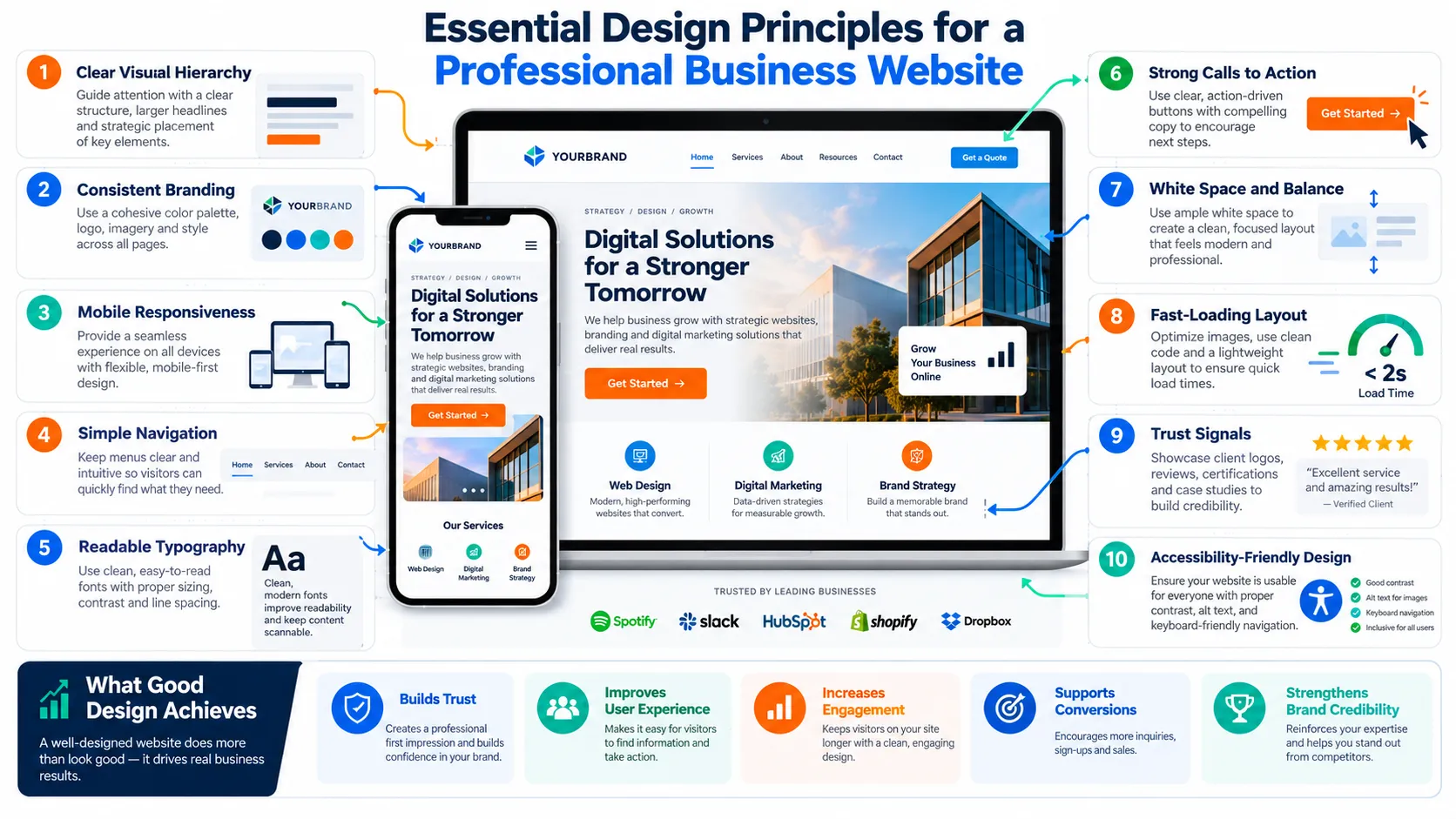
Establish a Clear Visual Hierarchy
Visual hierarchy helps visitors identify the most important information first.
Use headings, spacing, contrast, typography, and layout to distinguish the primary message from supporting details. Make important actions easy to recognize, and avoid placing multiple competing calls to action in the same visual area.
Consistency also matters. Reuse typography scales, button styles, spacing rules, and visual components across related pages.
Prioritize Responsive Design
A responsive website adapts its layout to different screen sizes and viewing conditions. Navigation, text, images, forms, and interactive components should remain usable on mobile devices, tablets, and desktop screens.
Test actual user journeys rather than checking only whether the homepage fits a narrow screen. A form might technically fit while still requiring excessive scrolling or creating difficulty with keyboard input.
Business website design and development should account for smaller screens from the beginning, because changing a desktop-only layout later can require substantial rework.
Improve Readability and Accessibility
Choose readable typography, appropriate line spacing, clear headings, and sufficient contrast. Make sure visitors can identify links, understand form labels, and operate interactive controls.
The W3C Web Accessibility Initiative explains why accessibility helps people with different abilities use digital products and services.
For text contrast, consult the WCAG 2.2 contrast guidance. WCAG Level AA generally requires a contrast ratio of at least 4.5:1 for normal text and 3:1 for large text, subject to the guideline’s defined exceptions.
Accessibility involves more than color. Semantic headings, keyboard operation, meaningful alternative text, clear error messages, and properly associated form labels also matter.
Website Development Foundations That Support Long-Term Growth
Good development makes a website reliable, maintainable, and capable of supporting its intended functions.
Use Maintainable Code and Components
Reusable components can reduce inconsistencies and make updates easier. Common examples include navigation elements, buttons, form fields, cards, and recurring page sections.
The implementation should follow the selected platform’s conventions and use dependencies that the team can maintain. Document unusual integrations and important configuration choices so future developers can understand the system.
Optimize Images and Other Assets
Large images and unnecessary scripts can increase loading times. Resize images to suit their display dimensions, choose appropriate formats, compress assets without unacceptable quality loss, and avoid loading unnecessary media.
Use lazy loading for suitable below-the-fold images, but avoid delaying the primary content image when it needs to appear immediately.
Every optimization should preserve usability. A technically smaller image is not an improvement if it becomes blurry or loses important information.
Build Reliable Forms and Integrations
Contact forms should request only the information the business needs to respond effectively. Clear labels, sensible validation, understandable error messages, and an obvious confirmation state improve usability.
Test form submissions end to end, including email delivery, CRM connections, spam protection, analytics events, and mobile behavior.
If the business depends on appointment booking, payment processing, or third-party APIs, test failure conditions as well as successful transactions.
Protect the Website
Security should form part of the development and maintenance process.
Use HTTPS, appropriate access controls, strong authentication, supported software versions, regular backups, and a documented recovery procedure. Review third-party extensions and remove components the website no longer needs.
A backup is useful only if the team can restore it successfully. Test restoration procedures periodically and clarify who responds if the site becomes unavailable.
GrowthAxis Solutions also offers Website Maintenance for businesses that need help keeping their website updated, functional, and ready for ongoing improvements.
SEO Foundations for Business Website Design and Development
SEO should influence planning, page structure, content, and technical implementation from the start. Adding basic optimization after launch can work, but early planning reduces avoidable structural problems.
Create Descriptive URLs and Page Titles
Each important page should have a clear title that describes its subject and matches the page’s purpose. Use concise, understandable URLs that reflect the page topic.
Write unique titles and useful meta descriptions for important pages. Google may generate a different search snippet depending on the query, so a meta description should summarize the page accurately rather than promise a guaranteed display.
Use the primary keyword where it fits naturally, particularly in the page title, main heading, and relevant explanatory content. Avoid repeating it in every heading.
Organize Internal Links
Internal links help visitors discover related pages and help search engines find URLs through crawlable links.
A service page can link to a relevant guide that explains the problem it solves. A blog post can link to the corresponding service page when professional implementation would help the reader. A pillar article can connect related cluster articles that answer narrower questions.
For example, this article can link to GrowthAxis Solutions’ SEO & AI Search services because technical accessibility, useful content, and internal linking support the wider search strategy.
Use descriptive anchor text that explains what readers can expect. Do not force irrelevant links into paragraphs merely to increase the number of internal links.
Make Important Pages Discoverable
Create a logical navigation structure and an XML sitemap where appropriate. Check that important pages return the correct status codes, do not accidentally carry noindex directives, and can be crawled under the site’s intended configuration.
Use canonical URLs consistently when similar or duplicate URLs exist. Avoid creating multiple pages with substantially identical purposes simply to target minor keyword variations.
Google’s Search Essentials and SEO Starter Guide provide practical guidance on crawlability, links, content, and search visibility.
Add Structured Data When Appropriate
Structured data can help search engines interpret certain types of content and may enable eligible search features. However, markup must accurately reflect information that users can see on the page.
Use relevant structured data only when the page and website qualify under Google’s requirements. Validate the implementation with Google’s testing tools and monitor the results after launch.
Read Google’s introduction to structured data before implementation. Valid markup does not guarantee that Google will display a rich result.
Business website design and development should support SEO without turning every design decision into an attempt to manipulate rankings. The priority remains a useful website that meets audience needs.
Improve Website Speed and Core Web Vitals
Performance affects how visitors experience a website. Slow loading, unstable layouts, and delayed interactions can frustrate users, especially when they need to complete a form or explore a service.
Google’s page experience guidance recommends considering overall usability, mobile presentation, security, and Core Web Vitals rather than optimizing a single score in isolation.
The current Core Web Vitals focus on three dimensions.
Largest Contentful Paint (LCP) measures loading performance. Interaction to Next Paint (INP) measures responsiveness to user interactions. Cumulative Layout Shift (CLS) measures unexpected visual movement.
Google’s web.dev Core Web Vitals guide explains these metrics and their recommended thresholds.
Use PageSpeed Insights, field data in Chrome UX Report where available, and Search Console’s Core Web Vitals report to identify issues. Lab tests help diagnose problems, while field data shows how real users experience eligible pages.
Prioritize improvements according to their likely effect on the user journey. Reducing an oversized hero image, removing unnecessary JavaScript, improving server response, or reserving space for images may provide more practical value than chasing a perfect score without understanding the cause of poor performance.
Conversion Optimization: Turn Visitors Into Customers
A website should help visitors move from understanding the business to taking an appropriate next step.
Conversion optimization begins by identifying the action that matters. A service company may want consultation requests, while a product company may want purchases or trial registrations.
Make Calls to Action Specific
A call to action should describe what happens when the visitor clicks it. Labels such as “Request a Quote,” “Book a Consultation,” or “View Services” can provide more context than a generic button.
The right label depends on the offer and the user’s readiness. Someone reading a beginner’s guide may prefer another educational resource, while a visitor on a detailed service page may be ready to request a proposal.
Avoid placing several competing primary actions beside one another unless the page genuinely serves distinct user needs.
Reduce Form Friction
Long forms can discourage enquiries when they request information the business does not need immediately.
Ask for essential details first, such as the contact information and project context needed to respond. Explain why any sensitive or unusual information is necessary, and make required fields obvious.
Test the complete submission process on mobile and desktop. Verify that errors appear clearly, submitted information reaches the intended destination, and visitors receive a confirmation.
Match the Landing Page to the Visitor’s Expectations
If an advertisement promises a particular service, the landing page should address that service directly. If an article recommends a consultation, the destination should explain how the consultation works.
A mismatch between the message and destination creates confusion and can reduce conversion opportunities.
This is why business website design and development should coordinate content, design, SEO, and campaign planning rather than optimizing each discipline independently.
How to Choose a Website Design and Development Agency
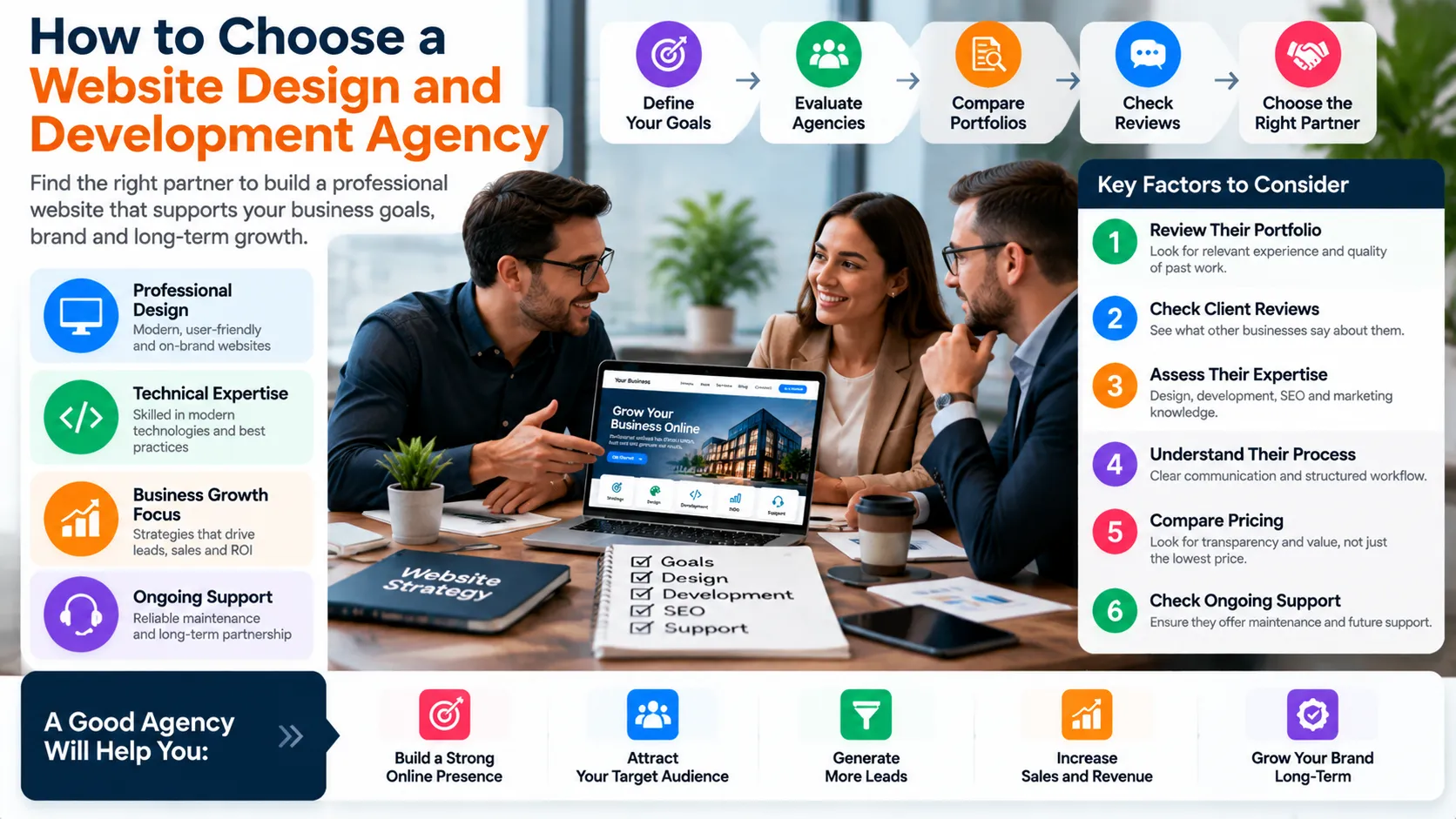
Selecting a provider requires more than comparing attractive portfolios or searching for the lowest quotation.
People searching for the best web design agency websites often want examples that demonstrate both visual quality and practical business thinking. Those examples can be useful, but the agency’s own website is only one piece of evidence.
When comparing the best web design companies, examine relevant client work, technical expertise, communication, scope clarity, and post-launch support. The best web design company websites may look impressive, but a polished agency homepage does not prove that its team can deliver your specific requirements.
The same caution applies when researching the best web design firms and best web design services. Compare providers according to your project’s needs rather than relying exclusively on generic rankings.
If your project involves application logic or complex integrations, evaluate the best web development agencies and best web development companies according to their technical capability, testing process, documentation, and maintenance arrangements. If you need a broader partner, identify the best website design agency for your industry, platform, and growth objectives rather than assuming one provider suits every business.
Some buyers also search for the best website design companies or the best website design company website to compare providers and inspect their own online presence. Use these searches as a starting point, then investigate evidence beyond the marketing claims.
Clutch’s web design services guide discusses provider selection, reputation, expertise, service scope, pricing, and maintenance. Its web design company directory can help buyers discover and compare agencies, although any directory’s rankings or listings should be assessed against your own requirements.
Evaluate the Portfolio and Process
Look at examples that match your industry your business model, your platform or the complexity of your project. Visit the sites, on both mobile and desktop. Try the navigation. Check the main customer journeys.
Ask the agency to explain the discovery process the content requirements, the design approvals, the development stages, the testing procedures and the launch support.
A reliable provider should describe the scope in language identify the dependencies and explain how the provider will handle changes.
Clarify Ownership and Support
Before signing an agreement, establish who owns the domain, hosting account, source code, design files, content, and licensed assets.
Confirm whether the business receives administrative access and whether another developer can maintain the website if the original provider becomes unavailable.
The contract should explain the deliverables, milestones, revision limits, payment schedule, third-party costs, and maintenance arrangements. These details protect both parties and reduce misunderstandings.
Assess SEO and Performance Expertise
Ask how the provider handles page structure, crawlability, responsive behavior, accessibility, performance, analytics, redirects, and launch verification.
An agency should not promise guaranteed first-page rankings or fixed traffic growth without acknowledging the factors that influence results. Strong providers explain what they can control, how they will measure progress, and what remains uncertain.
GrowthAxis Solutions connects web development with digital marketing and SEO through its Services overview, allowing businesses to consider related capabilities when their project requires them.
A Practical Website Development Process
Step 1: Discovery and Requirements
The team clarifies the business objective, audience, scope, content needs, functionality, integrations, budget, and timeline. It also identifies technical or operational constraints that could affect delivery.
Step 2: Sitemap and Wireframes
The team maps page relationships and creates wireframes to show content hierarchy, navigation, and important interactions before investing in detailed visual design.
Step 3: Visual Design
Designers develop the visual direction, reusable components, responsive layouts, and key page designs. Stakeholders review the work against agreed requirements rather than subjective preferences alone.
Step 4: Development and Integration
Developers implement the approved design, content management features, forms, integrations, and required functionality. They document important configuration decisions and follow appropriate security and coding practices.
Step 5: Content and SEO Implementation
The team adds reviewed content, page titles, headings, metadata, internal links, images, and suitable structured data. It checks that the site’s content reflects the agreed business goals and audience needs.
Step 6: Quality Assurance
The team tests forms, navigation, mobile layouts, supported browsers, integrations, accessibility, security settings, performance, redirects, and error handling.
Step 7: Launch and Improvement
The team verifies the production website, checks analytics and search settings, confirms backups, and monitors early issues. After launch, it reviews user feedback and performance data to prioritize improvements.
Website Launch Checklist
Use this checklist before making the website public. Assign responsibility for each item and record any issue that must be resolved before launch.
- Confirm that every important page has accurate, approved content and a clear purpose.
- Test navigation, forms, buttons, checkout or booking flows, and all essential integrations.
- Check responsive layouts, keyboard navigation, text contrast, form labels, and meaningful image descriptions.
- Verify HTTPS, administrator access, backups, update procedures, and recovery arrangements.
- Review page titles, meta descriptions, headings, URLs, canonical tags, robots directives, and internal links.
- Check redirects, sitemap configuration, crawlability, and the intended indexing status of important pages.
- Test loading performance and investigate significant Core Web Vitals problems.
- Confirm analytics, conversion events, contact notifications, and reporting access.
- Verify ownership of the domain, hosting, code, content, design files, and relevant licences.
- Prepare a post-launch monitoring plan with named owners and a process for reporting problems.
A structured business website design and development launch process reduces avoidable errors and makes it easier to identify who must address each issue.
Common Mistakes to Avoid
- Starting with visual trends instead of business objectives. A design may look modern but still fail to explain the offer or guide visitors toward meaningful actions.
- Trying to serve every audience on one page. Different services and audiences may need dedicated pages with specific messages and clear navigation.
- Ignoring mobile usability. A website that works on a desktop can still create problems with small text, awkward forms, or inaccessible menus on phones.
- Treating SEO as a final step. Changing URL structures, navigation, and page hierarchy after launch can introduce avoidable work and migration risks.
- Choosing the cheapest quote without reviewing scope. A low initial price may exclude content, integrations, testing, training, or ongoing support.
- Adding unnecessary complexity. Custom features should solve real problems. Avoid expensive integrations and elaborate animations that provide little practical value.
- Failing to plan maintenance. Software updates, backups, security reviews, and performance monitoring remain necessary after the website goes live.
- Measuring only traffic. Monitor meaningful enquiries, purchases, qualified leads, and user journeys rather than treating visits as the final objective.
- Accepting unverified guarantees. No developer can guarantee search rankings or business revenue simply by building a website.
Avoiding these mistakes helps businesses use their development budget more effectively and make informed decisions throughout the project.
Website Cost, Budget, and Scope
The cost of business website design and development depends on the number of pages, content requirements, visual complexity, functionality, integrations, platform, security needs, and level of ongoing support.
A simple informational website generally requires less work than an ecommerce store with inventory synchronization, payment integrations, user accounts, and automated order processing. A custom business application may require additional discovery, architecture, testing, documentation, and maintenance.
Request proposals that describe deliverables rather than vague promises. Compare what each quotation includes, which assumptions it makes, and which costs remain separate.
Ask whether the quote covers content preparation, revisions, mobile testing, SEO setup, analytics, training, launch support, and post-launch fixes. Confirm the price and approval process for changes that fall outside the original scope.
A sensible budget also accounts for ongoing hosting, domain renewal, software licences, content updates, security maintenance, and future improvements.
Business website design and development should provide a useful foundation without committing the organization to unnecessary spending. Start with the requirements that directly support the current business objective, then expand as genuine needs emerge.
Measure Website Performance After Launch
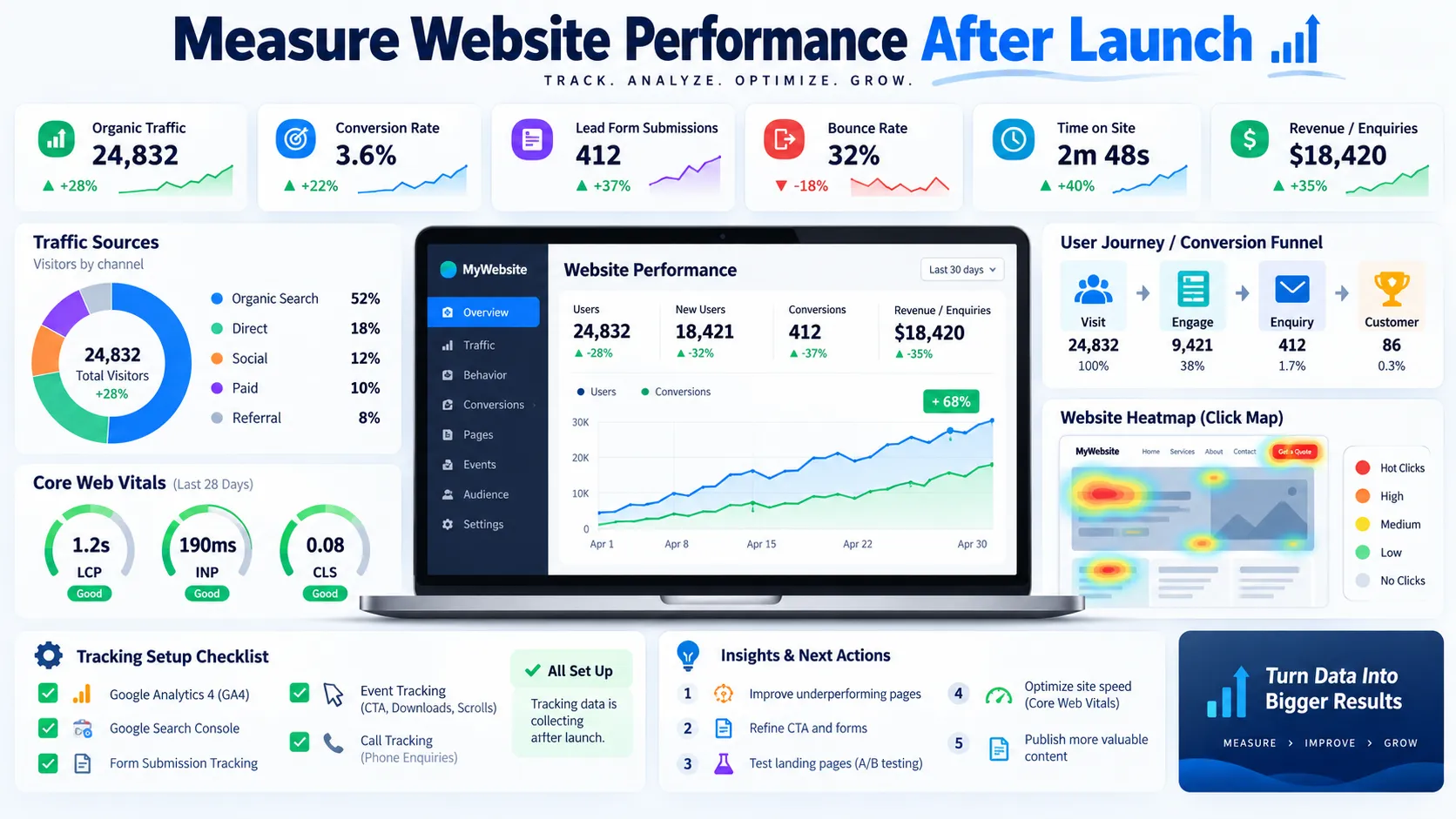
Launching the website does not finish the work. Measurement helps the business understand whether the site attracts the right visitors, supports user needs, and produces the intended outcomes.
Monitor Search Performance
Google Search Console can help identify impressions, clicks, search queries, click-through rates, indexing problems, and eligible performance reports. Review which pages attract relevant searches and whether important pages appear in the expected results.
If a page receives impressions but few clicks, review the query, title, description, search appearance, and position before changing the content. If a key page receives no meaningful impressions, investigate indexing, internal links, search intent, content relevance, and competition.
Avoid changing several important elements simultaneously when you need to understand what caused a performance change.
Monitor Conversions and User Journeys
Use an analytics platform such as Google Analytics 4 to measure configured events and conversions. Depending on the business, these may include successful form submissions, booked consultations, purchases, trial registrations, or other valuable actions.
Check whether visitors reach important pages, interact with calls to action, and complete the intended process. Investigate significant drop-off points instead of assuming that every visitor who leaves represents a design failure.
Review conversion quality as well. A form that generates many enquiries may still create little business value if most enquiries fall outside the company’s service scope.
Prioritize Improvements
Combine quantitative data with user feedback. Analytics may show where people abandon a process, while customer conversations can explain why the process feels difficult.
Use those findings to prioritize changes according to potential business value, implementation effort, risk, and confidence in the diagnosis.
For example, fixing a broken enquiry form may deserve attention before redesigning an entire homepage. Clarifying a confusing service description may help more than adding a new animation.
A mature business website design and development strategy treats the website as an evolving business asset rather than a one-time design project.
Pro Tips for Long-Term Website Growth
Keep a record of major design and development decisions. Documentation should explain important integrations, tracking configurations, redirects, ownership, and recurring maintenance tasks. This makes future changes safer and reduces dependence on undocumented knowledge.
Plan content and website improvements together. When research identifies a new audience need, decide whether the best solution is a new article, a clearer service page, a landing page, or a change to the existing navigation.
Review third-party dependencies periodically. Remove unused plugins and scripts, verify licences, and update supported software. Maintain a staging environment when the site’s complexity or business importance makes pre-production testing valuable.
Use evidence to guide redesigns. Before replacing an existing website, review its current performance, useful pages, backlinks, conversion paths, and technical problems. Preserve valuable URLs where possible and plan redirects when changes are necessary.
Finally, establish a realistic improvement schedule. The right frequency depends on the site’s size, the rate of change, operational risks, and the availability of reliable performance data. Consistent, targeted improvements often provide more value than frequent redesigns without a clear business reason.
Conclusion
Business website design and development should combine clear strategy, intuitive design, reliable technology, accessibility, SEO, and measurable conversion goals. The strongest website is not simply attractive; it helps the right visitors understand your value and take meaningful action. Contact GrowthAxis Solutions to discuss a website plan aligned with your business goals and future growth.
Frequently Asked Questions
1. What is business website design and development?
Business website design and development is the process of planning, designing, building, testing, and maintaining a website that supports a company’s objectives. Design shapes the visual experience and usability, while development implements the functionality, content management, integrations, and technical foundations that make the website work.
2. How much does business website design and development cost?
The cost depends on the number of pages, platform, design requirements, functionality, integrations, content preparation, and support needs. A simple business website generally costs less than a custom application or complex ecommerce platform. Request a detailed proposal that identifies deliverables, exclusions, ongoing costs, and change-request terms.
3. What pages should every business website have?
Most business websites need a homepage, About page, service or product pages, and a contact page. Depending on the business, useful additions may include case studies, a portfolio, a blog, FAQs, pricing information, and relevant privacy or legal pages. Choose pages according to audience needs and business requirements.
4. Which platform is best for a business website?
The best platform depends on the site’s functionality, budget, internal expertise, integrations, and maintenance requirements. WordPress suits many content-driven sites, hosted builders simplify some routine administration, ecommerce platforms support online stores, and custom development can address specialized workflows. Evaluate the complete requirements before selecting a platform.
5. How long does it take to build a business website?
A straightforward website may take several weeks, while a complex site or custom application may take months. The timeline depends on content readiness, stakeholder approvals, design complexity, integrations, testing, and project scope. A reliable provider should establish milestones, dependencies, and review deadlines before development begins.
6. Why is responsive design important for business websites?
Responsive design helps a website adapt to different screen sizes and devices. It supports readable content, usable navigation, accessible forms, and consistent functionality across mobile, tablet, and desktop experiences. Businesses should test real user journeys on different devices rather than assuming that a layout is usable because it technically fits the screen.
7. How does website design affect SEO?
Website design can influence how easily visitors navigate and understand content, while development affects crawlability, page structure, performance, and technical accessibility. Good SEO also requires relevant content, appropriate internal links, descriptive titles, and useful information. Attractive design alone cannot guarantee rankings, and strong performance scores do not guarantee top positions.
8. What is the difference between web design and web development?
Web design focuses on information hierarchy, visual presentation, interaction patterns, and user experience. Web development implements those designs through code, content management systems, databases, and integrations. Many projects require both disciplines to work together so the finished website looks appropriate, functions reliably, and supports the intended business goals.
9. How do I choose the best website design company for my business?
Review relevant portfolio examples, client feedback, technical expertise, project management, accessibility and SEO practices, pricing, and maintenance arrangements. Ask about ownership of code and assets, revision policies, testing, and post-launch support. Choose the provider whose documented capabilities and proposed scope best match your actual requirements rather than relying only on rankings or price.
10. How can I improve website conversions after launch?
Start by measuring important user journeys and conversion events. Review whether visitors understand the offer, find the relevant information, and complete forms or purchases without unnecessary friction. Use analytics, customer feedback, and controlled tests to identify improvements. Prioritize clear messaging, relevant calls to action, reliable forms, and landing pages that match visitor expectations.