
Project Overview
YouTube has become one of the most important platforms for businesses, educators, content creators and personal brands looking to build an audience, establish authority and reach potential customers. However, simply uploading videos does not guarantee visibility. A channel needs a clear identity, well-organized content, relevant video metadata, attractive visual presentation and a consistent optimization strategy to improve its chances of being discovered.
GrowthAxis Solutions worked on a YouTube channel optimization and video marketing project for Digital Marketing Tutorials Hub, a beginner-focused educational channel covering digital marketing, SEO, social media marketing, Google Ads, content creation, personal branding and online career opportunities.
The project combines three important areas: YouTube channel optimization, individual video SEO and Google Ads video promotion preparation. Our approach focuses on improving how a channel presents itself, how individual videos communicate their value to searchers and how paid video advertising can support content distribution.
Rather than treating YouTube SEO as simply adding keywords to a description, we consider the complete viewer journey: discovering a video, understanding its value, deciding to click, watching the content and exploring more videos from the channel.
Understanding the Channel and Its Growth Objectives
The first step in effective YouTube optimization is understanding what a channel offers and who it wants to reach. Digital Marketing Tutorials Hub is positioned as a beginner-friendly educational platform. Its content direction includes practical tutorials for people who want to learn digital marketing and develop useful online skills.
The channel description identifies several learning areas, including digital marketing fundamentals, search engine optimization, Facebook and Instagram marketing, YouTube channel growth, Google Ads, content marketing, personal branding and freelancing.
This gives the channel several opportunities to attract different groups of viewers, including students, beginners, aspiring freelancers, job seekers and people interested in developing digital skills.
Our optimization approach considers both the immediate objective of helping viewers find relevant tutorials and the longer-term objective of building a recognizable educational brand. A channel should communicate its purpose immediately so visitors can understand what they will learn and why they should subscribe.
YouTube Channel Branding and Visual Identity
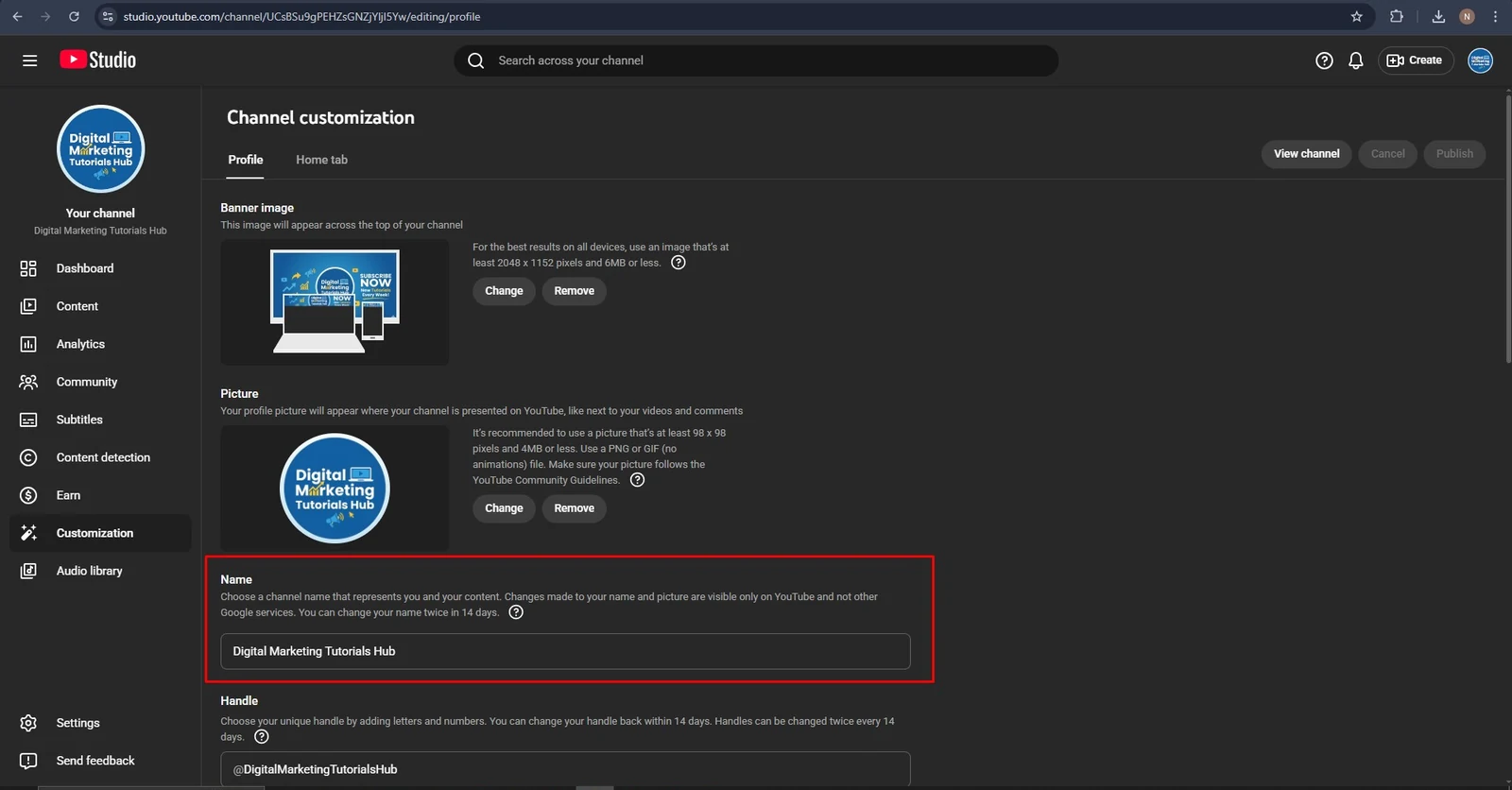
A professional YouTube channel needs a consistent visual identity. The channel name, profile picture, banner and overall presentation help visitors recognize the brand and understand its subject.
For Digital Marketing Tutorials Hub, the channel branding includes a dedicated profile image, a blue promotional banner and a consistent digital marketing theme. The channel name is displayed as Digital Marketing Tutorials Hub, with the handle @DigitalMarketingTutorialsHub.
We also prepared a separate promotional visual featuring a professional portrait, the message “Digital Marketing Experts” and a subscription call-to-action. The design uses a blue digital marketing theme to communicate expertise and encourage viewers to explore the channel.
The purpose of these visual elements is to create a consistent first impression across the channel and its promotional materials. Branding should remain recognizable whether a visitor discovers the channel through a video, an advertisement or a shared link.
A channel’s visual identity is not only decoration. It helps communicate the subject, establish recognition and make the overall viewing experience more professional.
Channel Description and Content Positioning
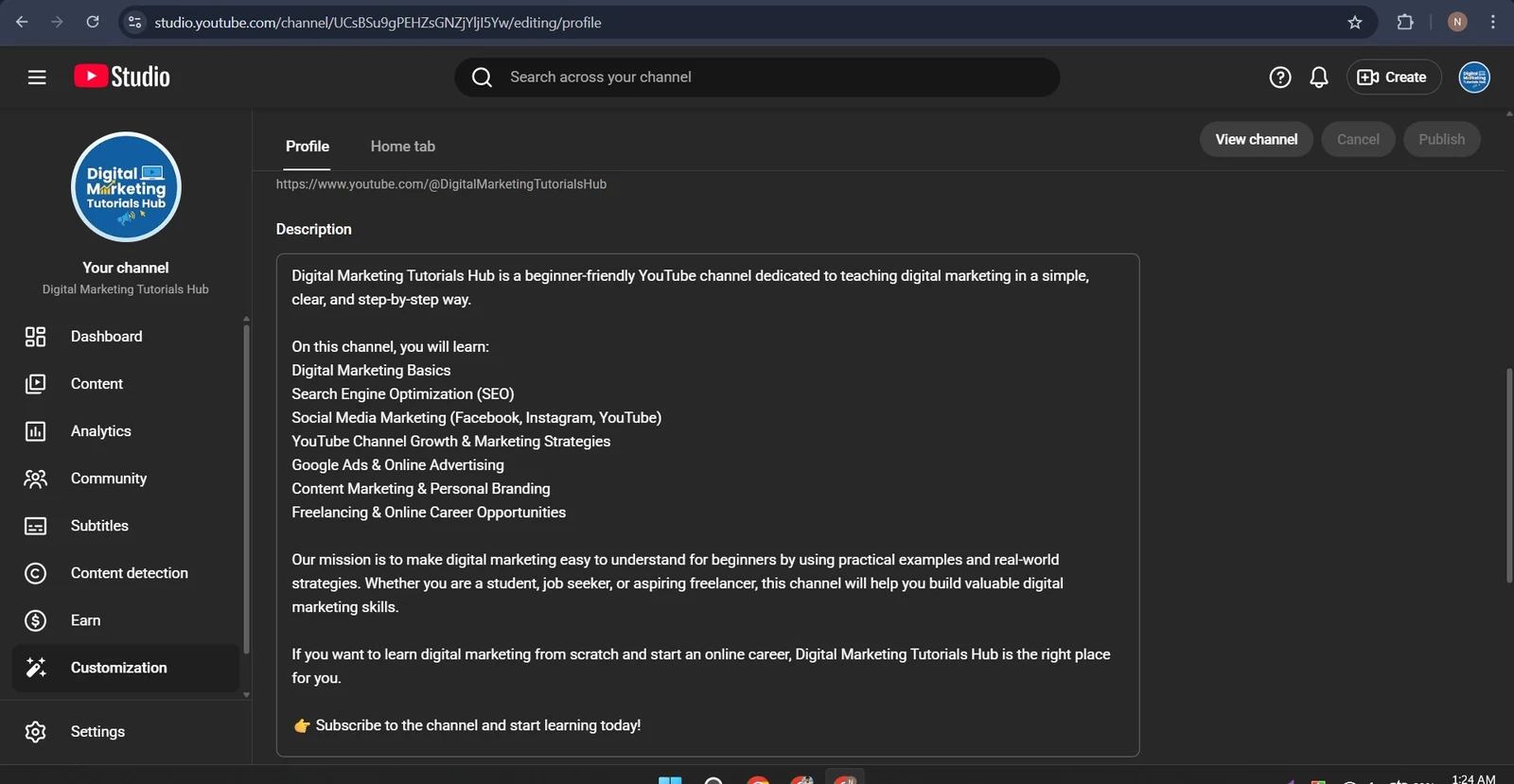
The channel description is an important part of communicating what viewers can expect from a YouTube channel. A well-structured description should explain the channel’s purpose, identify its major content topics and encourage visitors to explore its videos.
For this project, the channel description introduces Digital Marketing Tutorials Hub as a beginner-friendly educational platform that teaches digital marketing in a simple, clear and step-by-step manner.
It organizes the channel’s learning areas into recognizable topics:
- Digital Marketing Basics.
- Search Engine Optimization (SEO).
- Social Media Marketing, including Facebook, Instagram and YouTube.
- YouTube Channel Growth and Marketing Strategies.
- Google Ads and Online Advertising.
- Content Marketing and Personal Branding.
- Freelancing and Online Career Opportunities.
The description also explains the channel’s mission: helping beginners understand practical digital marketing concepts through examples and real-world strategies.
This approach helps visitors understand the channel before watching a video. It also creates a clearer connection between the channel’s educational purpose and the subjects covered in its content.
For future growth, we recommend organizing these subjects into dedicated playlists and consistent content series. This can make it easier for viewers to discover related tutorials and continue learning without repeatedly searching for individual videos.
Channel Links and Video Watermark
A YouTube channel should make it convenient for visitors to find additional information and connect with the brand outside the platform.
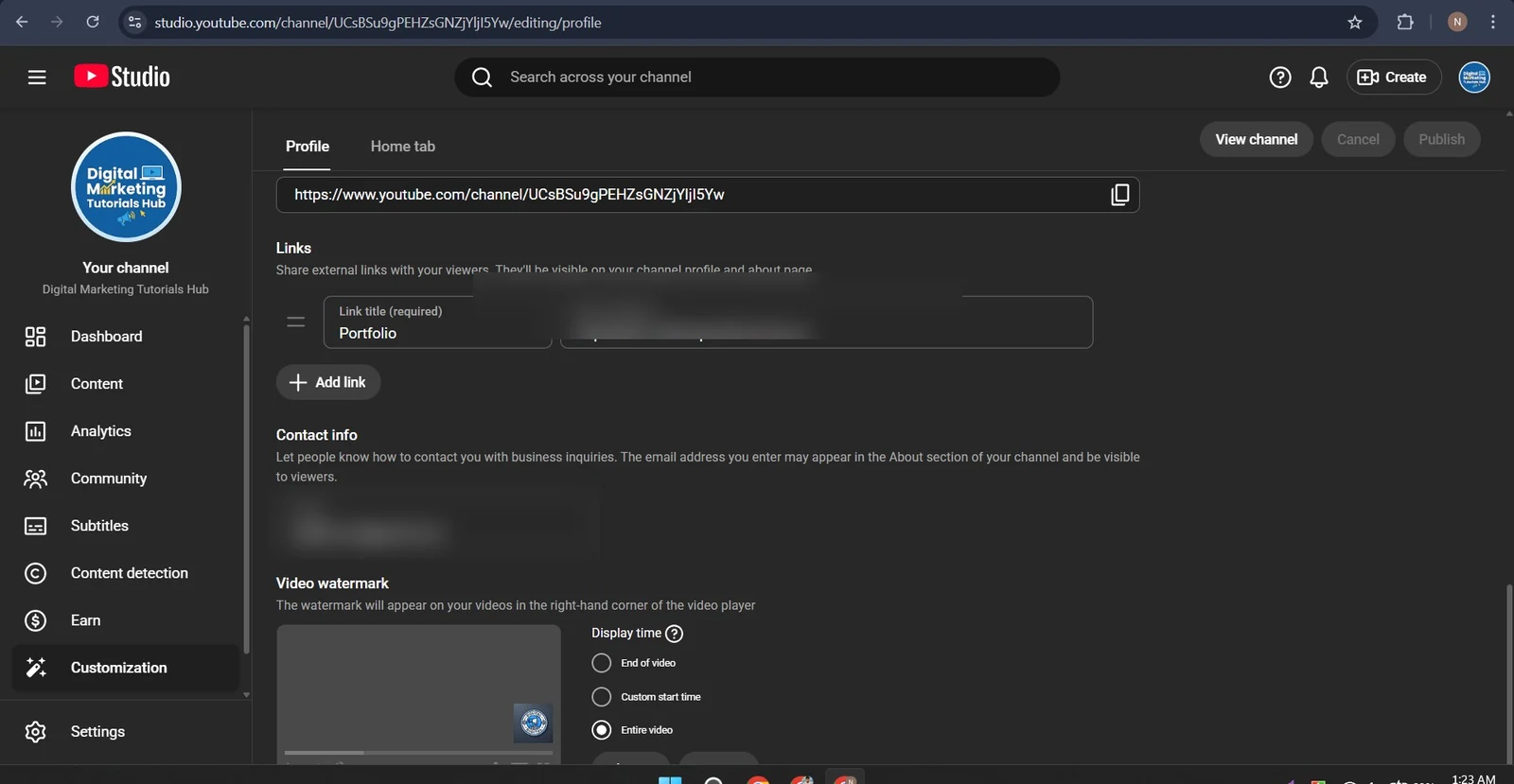
The channel profile settings show an external Portfolio link. This creates a connection between the educational channel and its wider online presence. External links can help viewers explore additional resources, professional services or related information when the destination is relevant.
The supplied settings also show a branded video watermark configured to display throughout the entire video. A video watermark provides a consistent visual subscription prompt while viewers watch content.
These elements contribute to a connected channel experience. Visitors can discover the channel, watch a tutorial, recognize the brand and explore its external resources.
For professional channel management, we also review link destinations, contact information and the visibility of branding elements to ensure that the channel presents a consistent and trustworthy identity.
YouTube Video Title, Description and Keyword Alignment
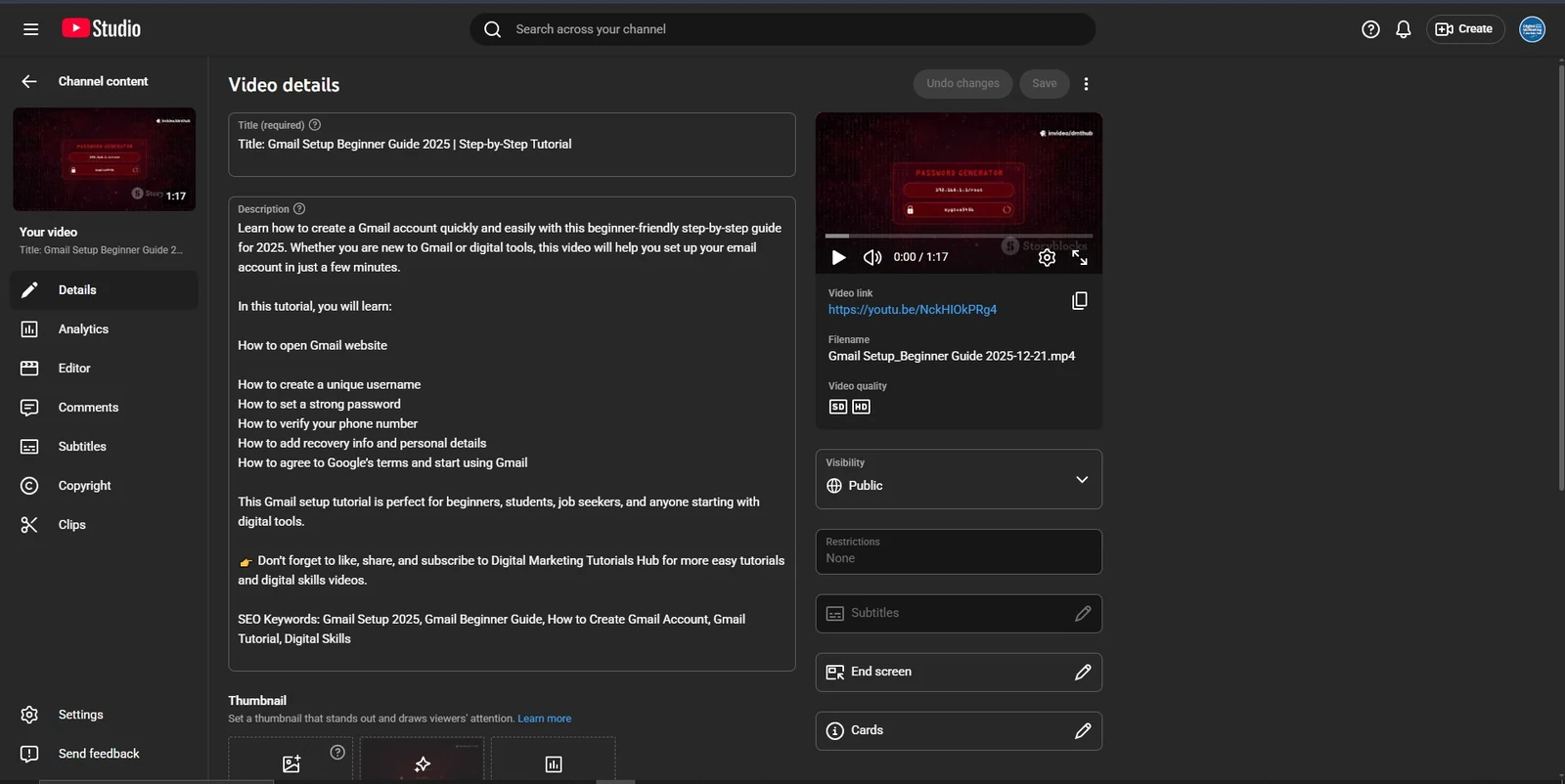
Video metadata plays an important role in helping YouTube understand what a video is about and helping viewers decide whether it answers their needs.
For this project, the published tutorial is titled:
Gmail Setup Beginner Guide 2025 | Step-by-Step Tutorial
The video description introduces the tutorial as a beginner-friendly guide to creating a Gmail account. It explains that viewers can follow the steps to set up an email account and identifies the main topics covered in the tutorial.
The visible description includes:
- How to open the Gmail website.
- How to create a unique username.
- How to set a strong password.
- How to verify a phone number.
- How to add recovery information and personal details.
- How to agree to Google’s terms and start using Gmail.
The description also includes a subscription call-to-action and relevant search phrases such as Gmail Setup, Gmail Beginner Guide, How to Create Gmail Account, Gmail Tutorial and Digital Skills.
Our approach to video metadata is based on matching the actual video content with the language people use when searching for information. Search phrases should be integrated naturally into the title and description rather than inserted repeatedly without context.
A useful description should do more than repeat keywords. It should explain the tutorial’s value, identify the topics covered and make the next step clear to viewers.
We also review whether the title remains relevant over time. Since this title includes the year 2025, an evergreen title or an updated year may be more suitable if the tutorial reflects the current Gmail interface.
Public Channel and Published Video Review
Publishing a video is only one stage of a successful YouTube strategy. After publication, the channel and video should be reviewed to ensure that visitors can access the content and understand its purpose.
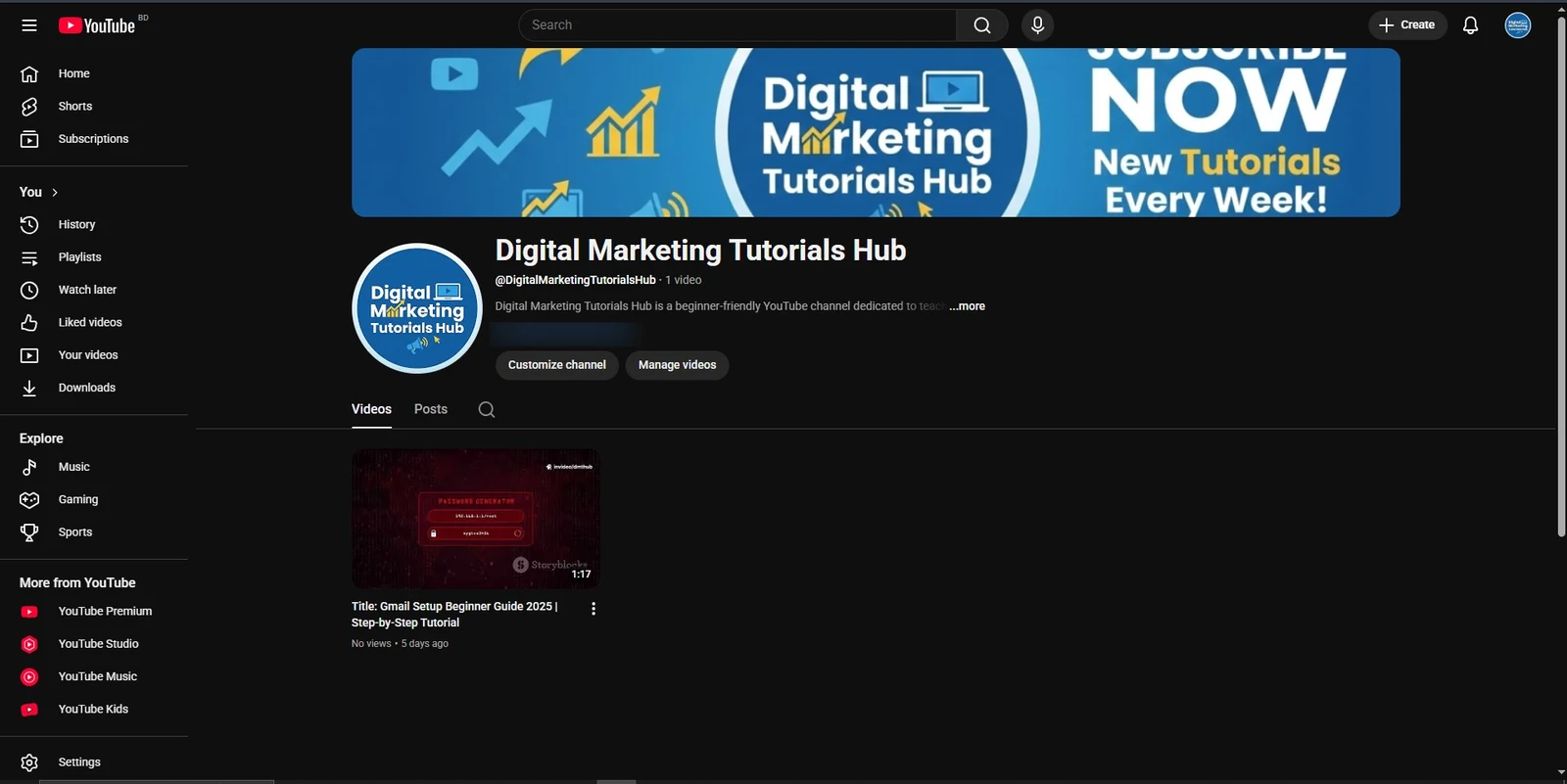
The supplied YouTube Studio screenshot shows the Gmail Setup Beginner Guide video with Public visibility and no restrictions. The public channel screenshot also shows the video listed under Digital Marketing Tutorials Hub.
This confirms the published-video setup represented in the supplied evidence. It also provides a foundation for future optimization and performance monitoring.
At the time of the supplied public-channel screenshot, the channel displayed one video and the video showed zero views, with a “5 days ago” upload label. We treat this as an early performance snapshot rather than presenting it as a successful growth result.
For a new or developing channel, the next stage should focus on building a consistent publishing schedule, developing related tutorial topics, improving video packaging and studying audience responses over time.
Google Ads Video Promotion Setup
Organic YouTube SEO and paid video advertising can support different parts of a content growth strategy.
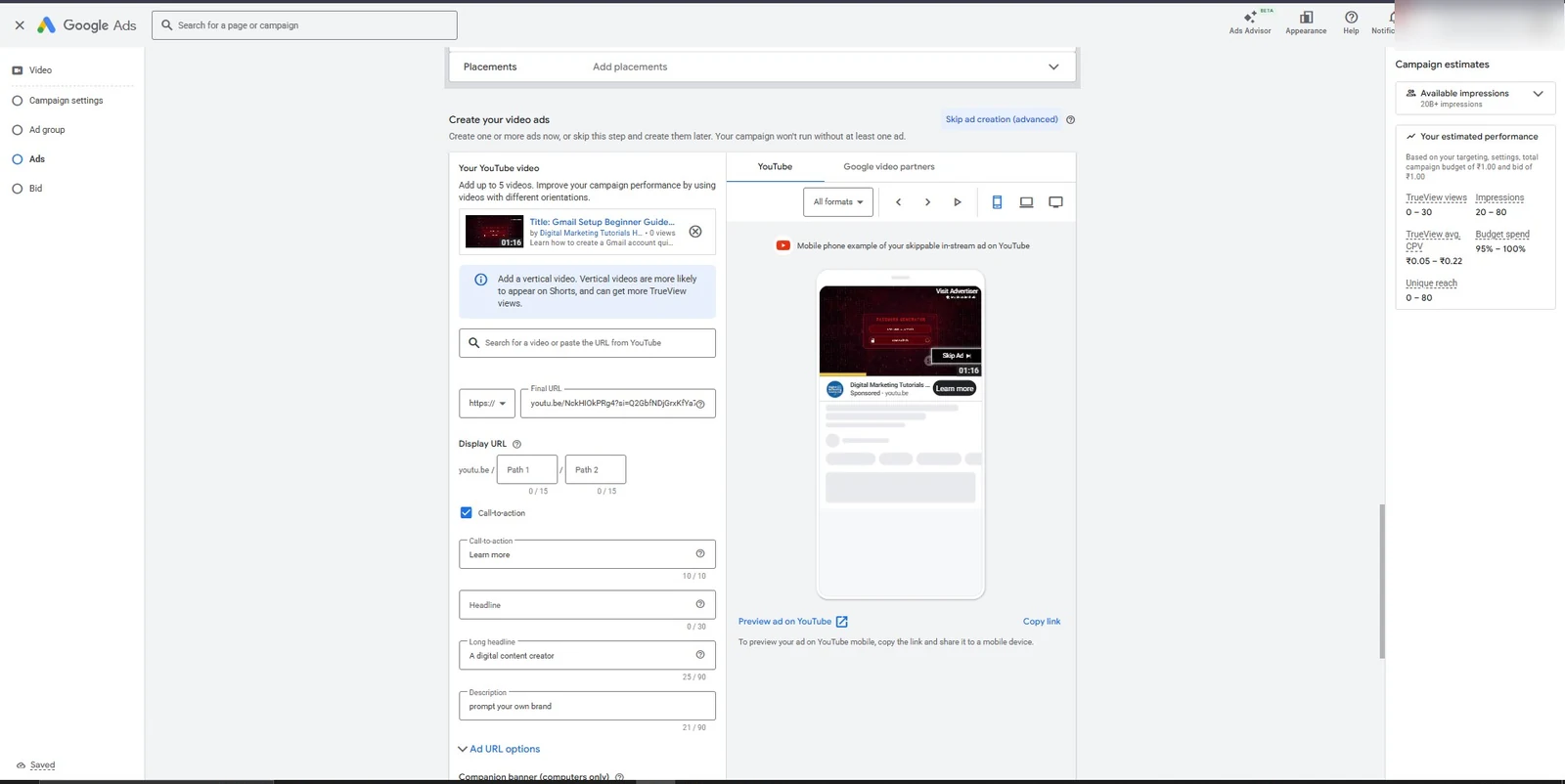
Organic optimization helps improve the relevance and discoverability of videos, while Google Ads can provide a paid distribution option when a business wants to promote specific video content to a selected audience.
For this project, the Google Ads interface shows a Gmail tutorial selected as the YouTube video asset. The final URL directs viewers to the video, and the campaign setup includes a video advertisement with a skippable in-stream preview.
Skippable in-stream advertising can place promotional video content before, during or after other eligible videos. Viewers can skip the advertisement after five seconds.
This format can be useful when the advertiser wants to introduce an educational video, demonstrate a tutorial or bring attention to a specific channel resource.
Our approach to video promotion considers the campaign objective, selected video, audience, budget, creative assets and destination. These elements should work together rather than being configured independently.
The supplied screenshots document the Google Ads setup and previews. They do not establish that the campaign was approved, activated or delivered impressions to real viewers.
Ad Creative, Companion Banner and Asset Preparation
An effective video advertisement needs a clear message and recognizable brand presentation. The ad creative should explain why someone should watch the video and what they can expect to learn.
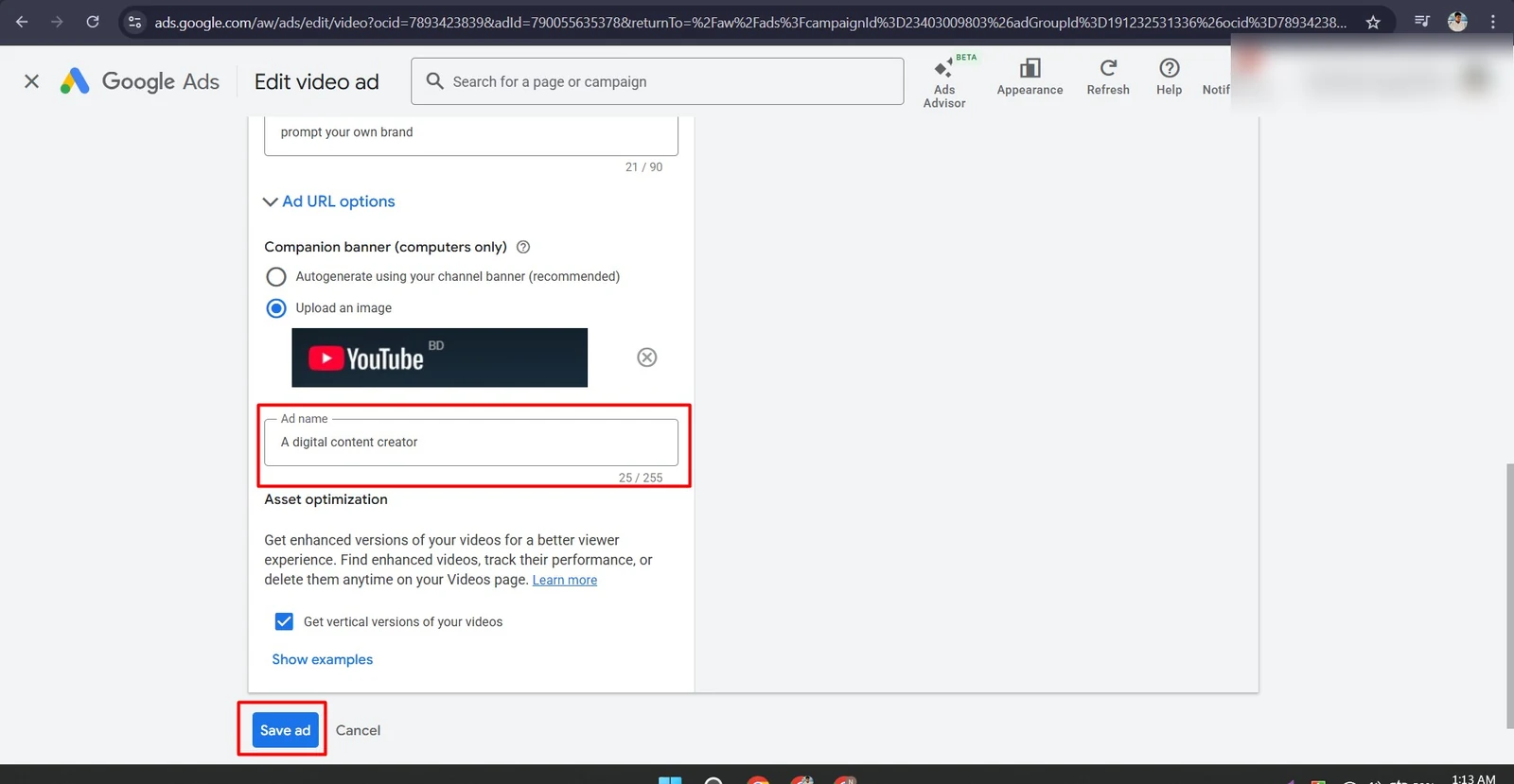
The Google Ads configuration shows a selected YouTube video, an uploaded companion banner and an ad name. It also shows the option to generate vertical versions of the video enabled.
Companion banners provide an additional visual element in eligible desktop advertising placements. They should use recognizable channel branding and communicate the same message as the main video advertisement.
We review the relationship between the video, companion banner, ad name, headline, description and call-to-action. Consistency is important because a mismatch between these elements can create confusion and reduce confidence.
For future campaigns, we recommend preparing dedicated horizontal, square and vertical creative assets where appropriate. Each format should be checked for readability, visual quality and message consistency before publication.
Mobile Video Ad Preview
Mobile devices are an important environment for YouTube content discovery. Video advertisements must be reviewed on smaller screens to ensure that the creative remains understandable and that important information is not lost.
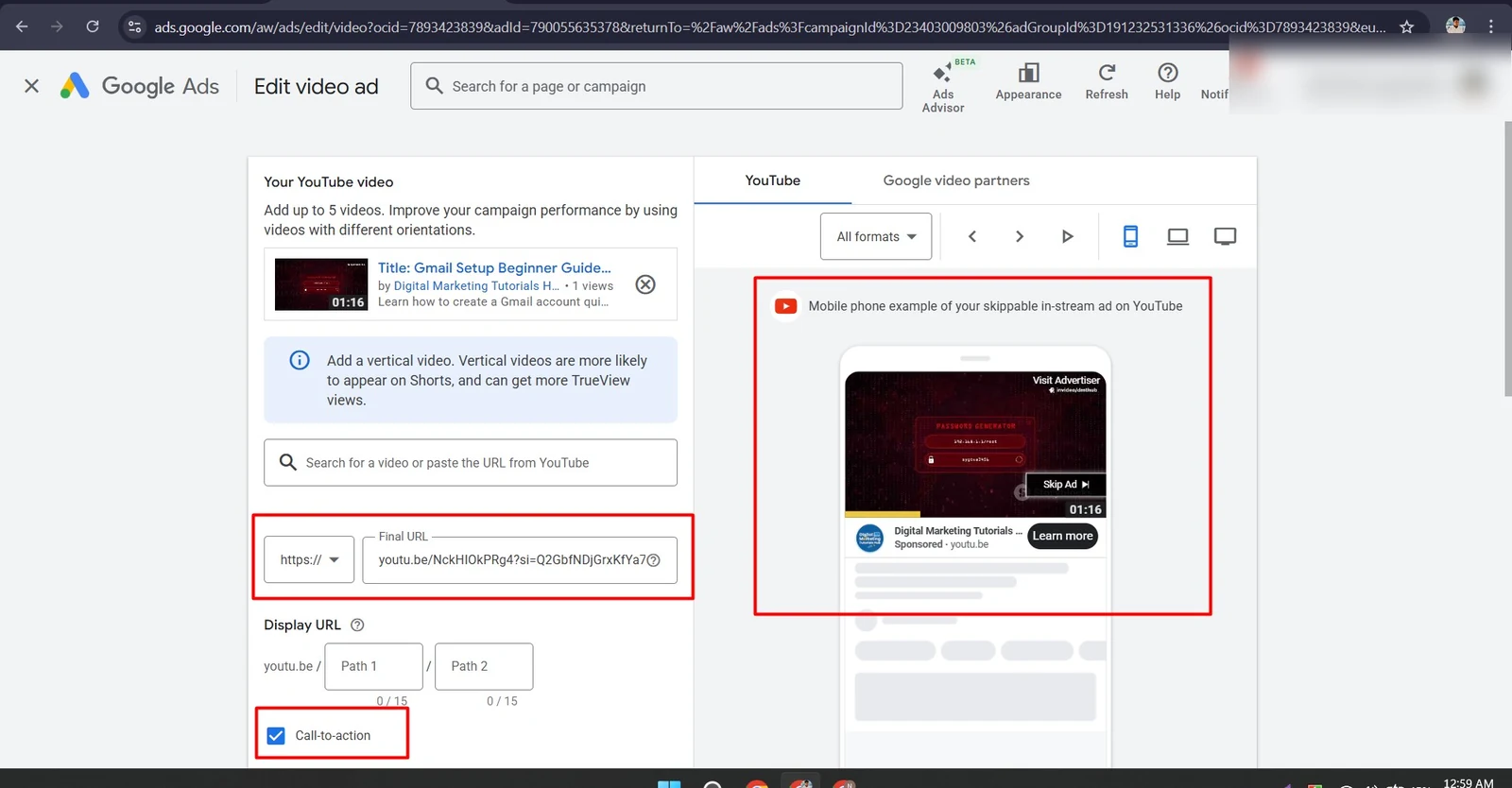
The supplied Google Ads screenshot displays a mobile phone preview of the skippable in-stream advertisement. It also shows the final video URL and the call-to-action setting.
This preview allows the advertiser to review how the video and promotional message may appear within a mobile viewing experience.
Mobile creative should use readable text, a clear subject and a strong opening. The first few seconds are especially important because viewers need to understand the value of the content before deciding whether to continue watching.
For campaigns that include Shorts placements, we also recommend preparing a native vertical video rather than relying entirely on automatic cropping of a horizontal video.
Desktop Video Ad Preview
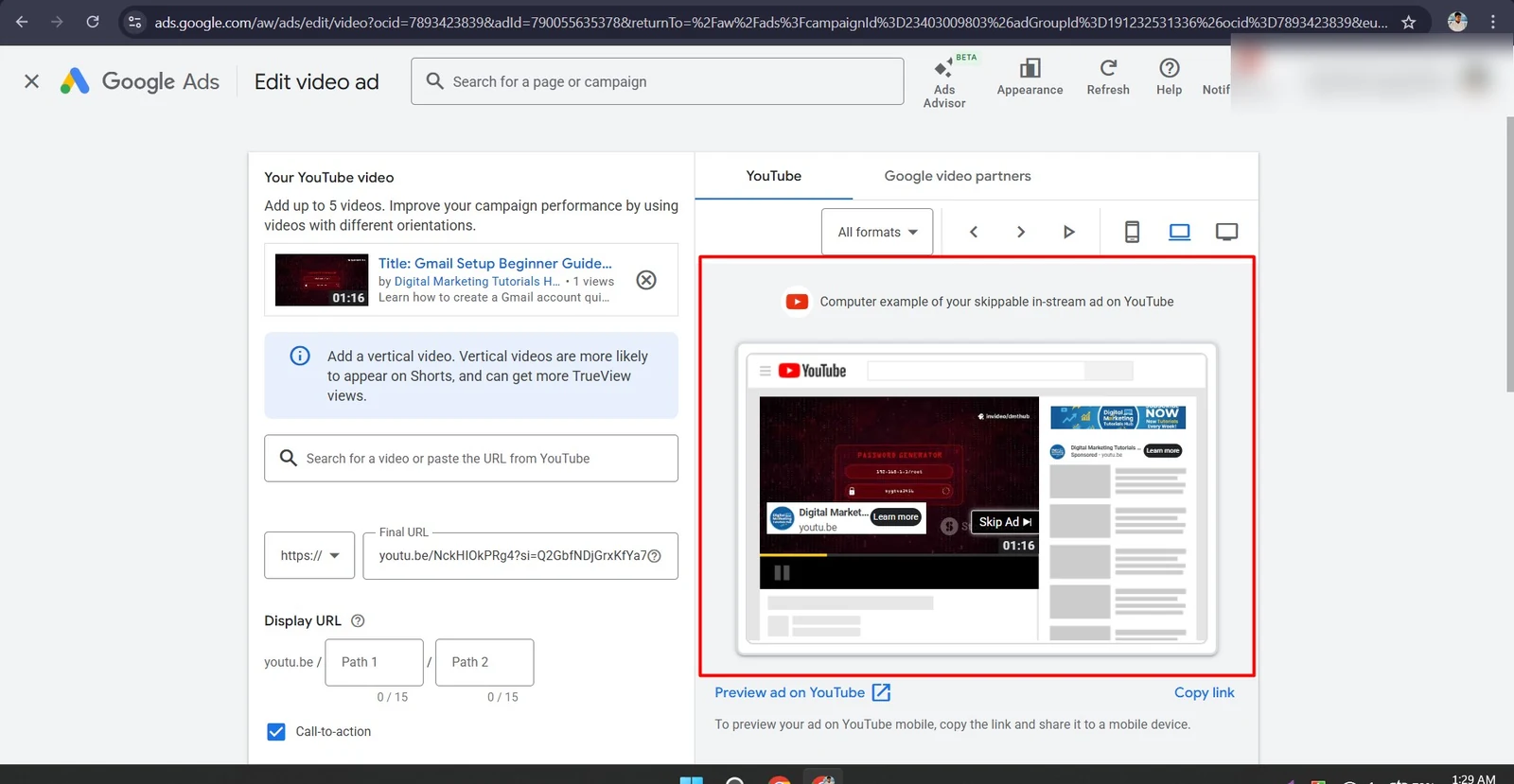
Desktop advertising provides a different viewing environment. The screen is larger, the surrounding YouTube interface is different and companion banners may appear alongside the video advertisement.
The desktop preview screenshot shows how the selected video advertisement can appear within a YouTube watch-page layout.
Reviewing desktop previews helps identify problems with banner visibility, headline presentation, video framing and brand consistency.
Our quality-checking process considers whether the advertisement communicates the intended message without distracting from the video itself. The final creative should make it easy for viewers to understand who is advertising and what they will gain by watching.
Connected TV Ad Preview
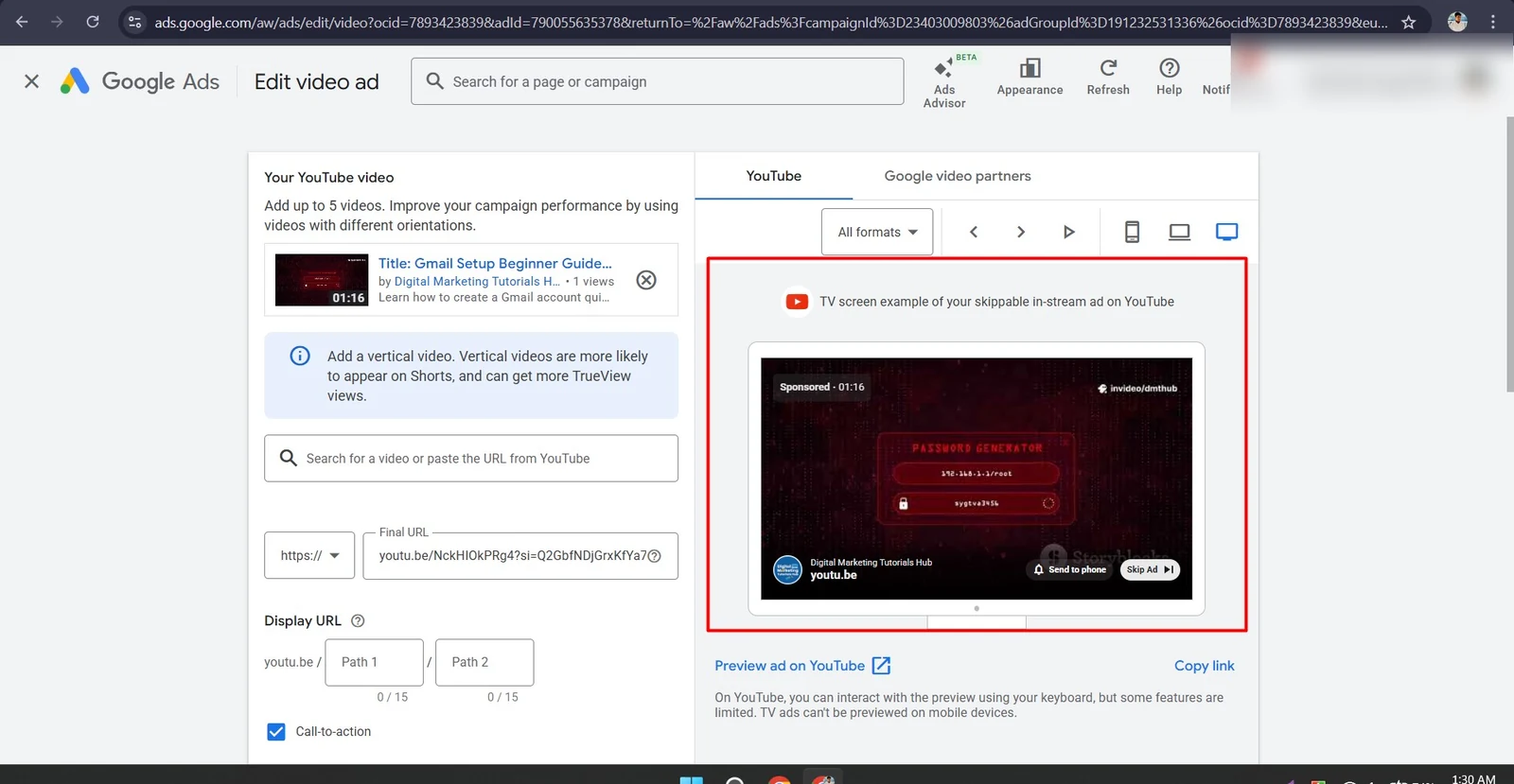
YouTube is also viewed on television and connected TV devices. A video advertisement designed only for desktop or mobile should not automatically be assumed to look equally effective on a television screen.
The connected TV preview allows the advertiser to review the video in a larger viewing environment. The supplied screenshot shows the skippable in-stream ad displayed in a TV-screen example.
This review is useful for checking whether the central message, branding and video content remain understandable at a distance.
Different devices create different viewing conditions. Our approach is to review the available previews before campaign publication rather than assuming that a single format will look perfect everywhere.
Display URL, Headline and Call to Action
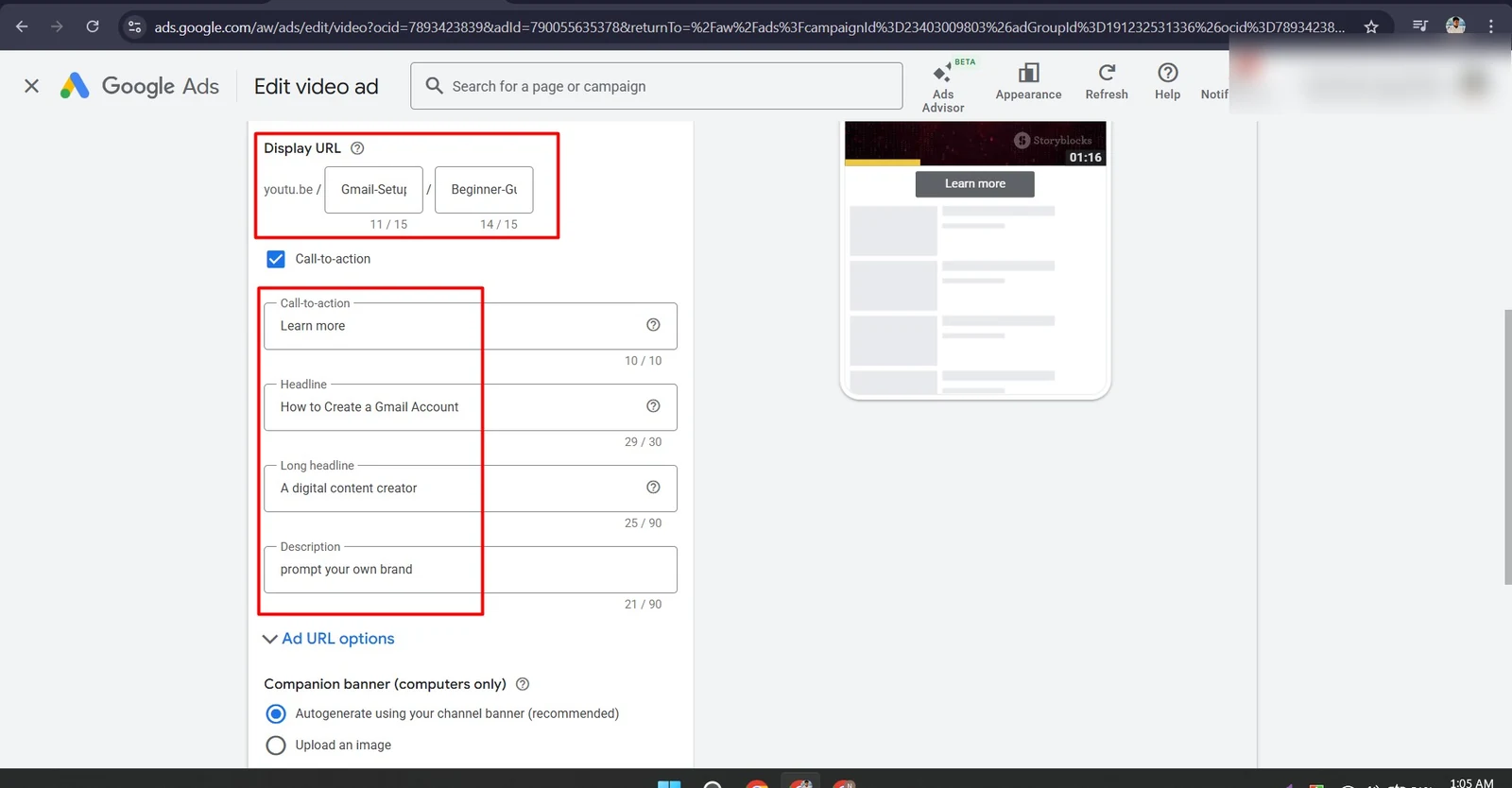
Advertising copy gives viewers a reason to take action. The headline, description, display URL and call-to-action should work together to explain the value of the promoted video.
The supplied Google Ads configuration includes the display URL paths Gmail-Setup and Beginner-G, a Learn more call-to-action and the headline How to Create a Gmail Account.
These settings help connect the advertisement with the tutorial’s subject. A relevant headline tells viewers what they can expect, while the display URL gives an additional indication of the destination.
We also review the longer headline and description to make sure they are specific to the promoted video. Generic placeholder wording should be replaced with accurate, audience-focused copy before the advertisement is launched.
For example, a stronger description could explain that the video provides a beginner-friendly, step-by-step Gmail account setup guide. The final wording should always reflect what the actual video delivers.
Problems We Identify and How We Solve Them
At GrowthAxis Solutions, we believe that effective YouTube SEO starts with identifying problems rather than applying random optimization techniques.
Our review of the supplied materials highlights several areas that require attention:
1. Video and thumbnail relevance: The supplied video preview displays a Password Generator visual with a visible Storyblocks watermark, while the title describes a Gmail setup tutorial. If this is the final video asset, it needs a relevant, properly licensed visual that accurately represents the tutorial.
2. Outdated year references: The title and description use 2025. We review year-based wording and recommend an evergreen title or an updated year when the video content supports it.
3. Channel content organization: The channel covers multiple digital learning subjects. We recommend organizing these into playlists and content series so viewers can navigate related tutorials more easily.
4. Incomplete advertising copy: Some Google Ads screenshots contain generic wording such as “A digital content creator” and “prompt your own brand.” These should be replaced with relevant promotional copy before the ad is published.
5. Campaign budget and forecast validation: The supplied campaign estimate uses a nominal budget and bid setting. Forecasts must not be presented as real campaign results. The final budget and bidding strategy should be approved according to the client’s objective.
6. Mobile creative preparation: The setup recommends adding a vertical video. We recommend preparing and reviewing a dedicated vertical asset when targeting suitable mobile placements.
By identifying these issues before promotion, we can reduce avoidable mistakes and create a stronger foundation for future channel and campaign growth.
Our YouTube SEO and Growth Strategy
GrowthAxis Solutions approaches YouTube SEO as an ongoing optimization process rather than a one-time metadata update.
Our service workflow can include:
- YouTube channel audits and optimization.
- Keyword research and search-intent analysis.
- Competitor and content-gap research.
- SEO-focused video title development.
- Natural video description optimization.
- Relevant tag and hashtag selection.
- Custom thumbnail planning and creative direction.
- Channel description and branding optimization.
- Playlist and content organization.
- Video publishing and metadata quality checks.
- Google Ads video campaign setup.
- Multi-device advertising preview and creative review.
- YouTube Analytics and audience-retention analysis.
- Continuous content and campaign improvement.
Not every deliverable above is separately evidenced in the supplied screenshots. The documented work specifically demonstrates channel branding and profile settings, description, links, watermark, video metadata, public video status and Google Ads promotion preparation.
Our objective is to help clients build a stronger foundation for organic discoverability and paid content distribution while keeping every recommendation connected to the actual audience and business goal.
Why Professional YouTube SEO Matters
A properly optimized channel makes it easier for visitors to understand what the brand offers. A relevant title and description help communicate a video’s subject, while an accurate thumbnail gives potential viewers a clear expectation of what they will watch.
These improvements can support better discoverability and help remove unnecessary barriers between a viewer’s search and the content they need.
However, no agency can honestly guarantee that every optimized video will rank first, become viral or receive a fixed number of views within a specific period. YouTube recommendations also depend on audience interest, competition, personalization and how viewers respond to the content.
That is why we focus on the factors that can be researched, improved and measured: search relevance, content quality, presentation, viewer engagement and consistent optimization.
Project Deliverables
The project documentation includes:
- YouTube channel branding and profile optimization.
- Channel banner, profile image and identity review.
- Channel description and content positioning.
- External channel link and video watermark configuration.
- Video title and description optimization.
- Search phrase integration in video metadata.
- Public video and channel review.
- Google Ads video promotion setup.
- Companion banner and advertising asset configuration.
- Mobile, desktop and connected TV ad previews.
- Display URL, headline and call-to-action review.
- Pre-launch advertising quality checks.
Conclusion
A successful YouTube presence requires more than publishing videos. It needs a recognizable channel identity, useful content, relevant metadata, effective visual presentation and a clear distribution strategy.
Through this project, GrowthAxis Solutions demonstrates a structured approach to YouTube channel optimization, video SEO and Google Ads video promotion preparation for Digital Marketing Tutorials Hub.
We focus on identifying visibility gaps, improving how content is presented and preparing channels and videos for more effective discovery. Our goal is to provide clients with practical, professional and transparent digital marketing services that support sustainable growth.
Looking to improve your YouTube channel, increase video discoverability or promote your content through Google Ads?
GrowthAxis Solutions can help you plan, optimize and manage your YouTube marketing strategy with an approach built around your audience, content and business objectives.
Let’s build a stronger YouTube presence together. Contact GrowthAxis Solutions to discuss your next project.